第三方表单服务Formspree简单使用

  • 记于:2025-12-04 晚上
  • 地点:浙江省·温州市·家里
  • 天气:晴天

背景#

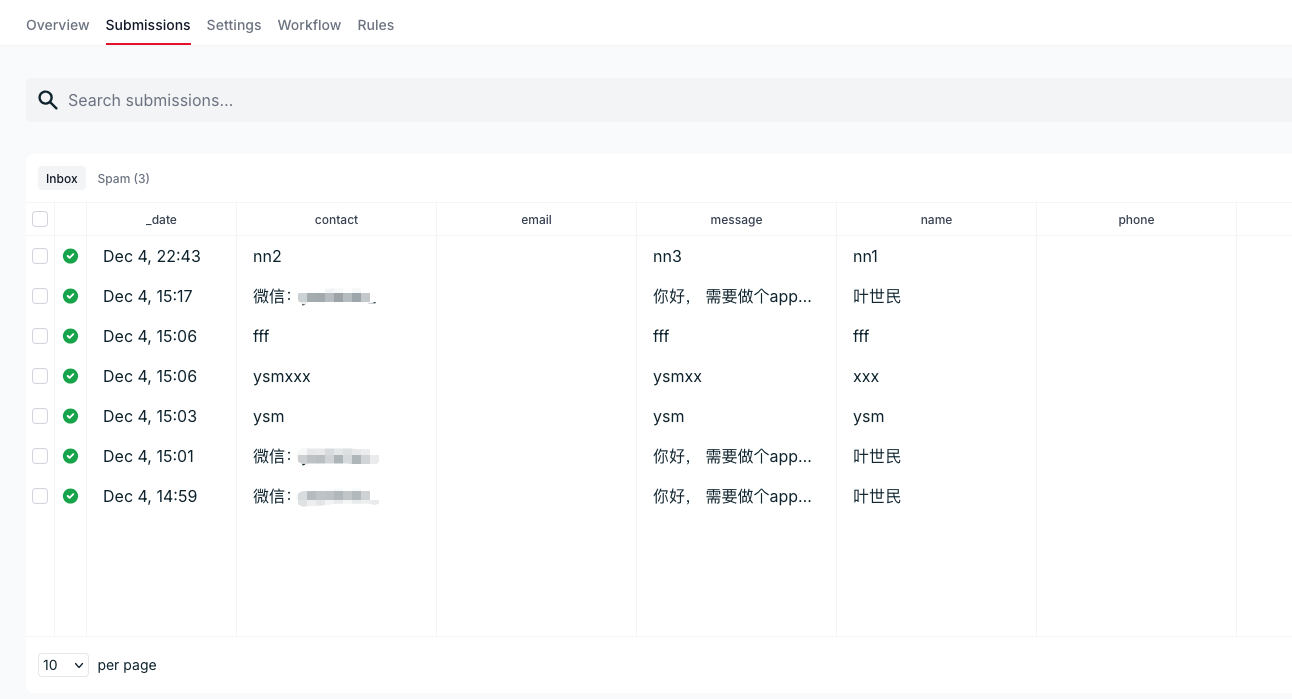
做了个公司官网,静态版本的,唯一的一个数据交互是“提交需求表单”;
又不想为此部署一套“重量级”的后端服务,找了些第三方的集成方案,包括飞书、钉钉等平台都有通知API;
但是不太想依赖这些,后来找到了个纯粹一些的第三方表单服务(Formspree,底部有官网链接);
使用也是比较简单的,只要将表单提交到特定地址,就能收到邮件通知。

集成#

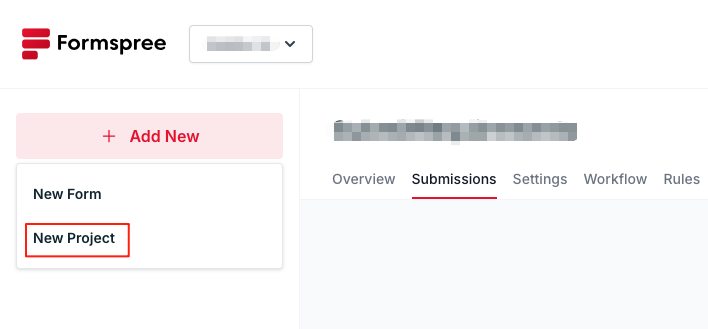
1.注册登录后,先创建一个项目(默认也会有一个项目):
image1

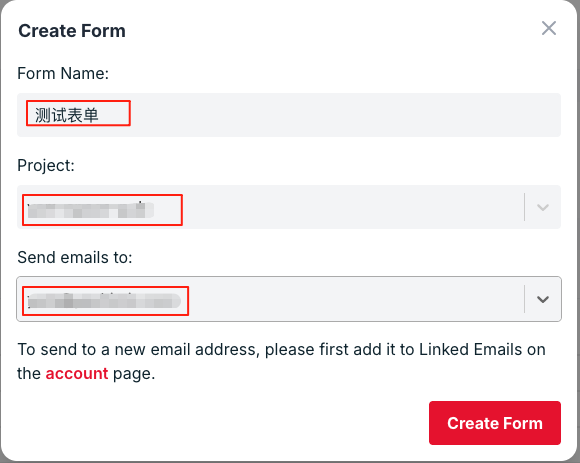
2.创建一个表单,填入表单名称、选择刚才创建的项目、接收通知的邮箱:
image2

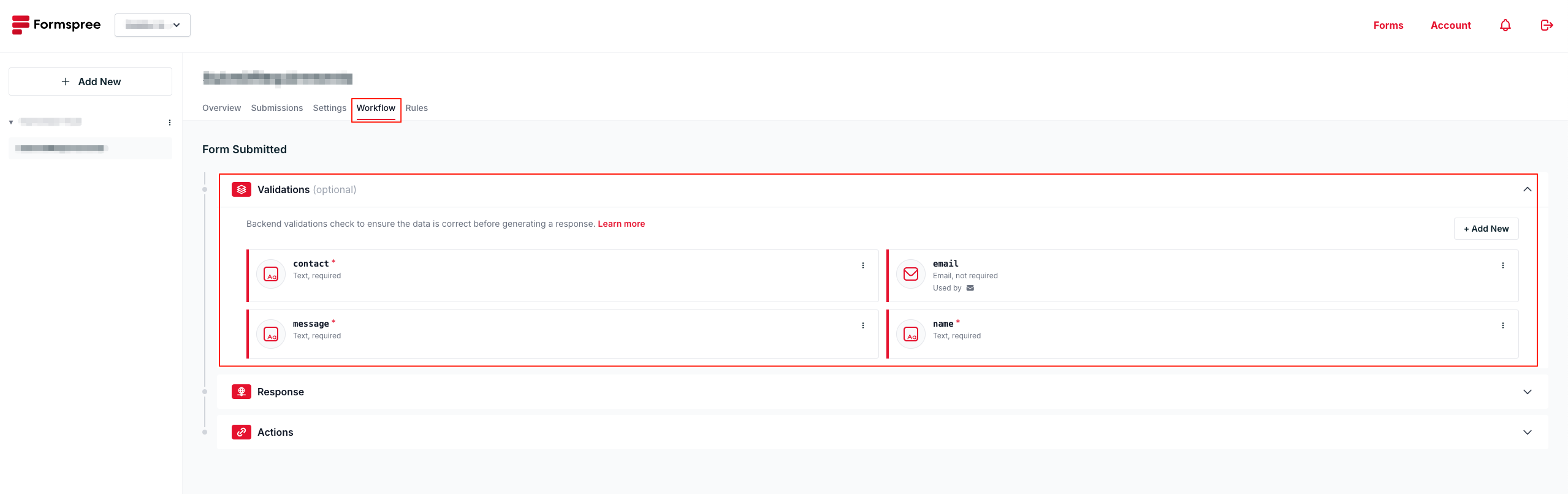
3.在表单的[Workflow]->[Validations]添加表单相应的字段名称,每个字段可以设置为是否必填、数据类型以及内容长度范围:
image3
注意:email字段是平台预置的,无法删除,但是可以修改是否必填
提示:这个[Validations]其实可以不用设置,需要校验字段的话设置一下
提示:下面的[Actions]可以设置表单提交后的动作,比如提醒方式、集成其他系统之类的

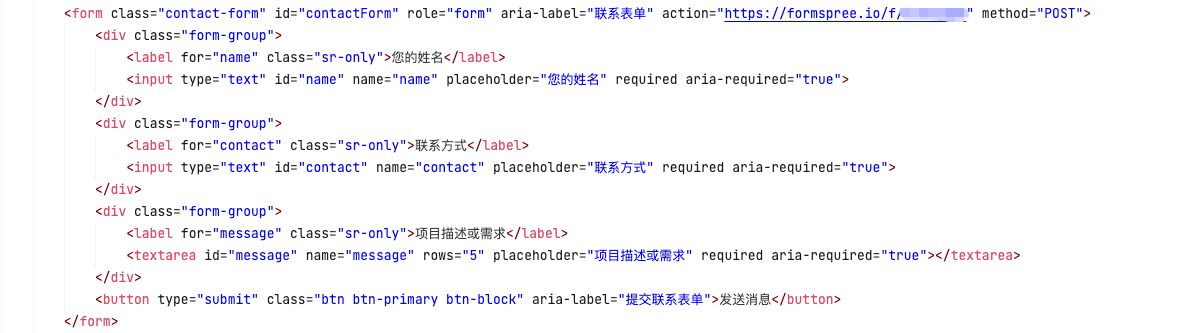
4.网页里表单设置action地址:
image4
提示:action地址是在[Overview]标签页里获取

5.效果:
image5
提示:创建表单时填写的那个邮箱也会收到通知邮件

链接#

API限流设计

  • 记于:2025-11-24 晚上
  • 地点:浙江省·温州市·家里
  • 天气:晴天

背景#

个人开源项目[yeah-boot]需要一个流控/限流组件;
虽然有一些成熟的开源流控组件,比如Alibaba Sentinel、Bucket4j、Guava RateLimiter等;
但就是想自己造个轮子。

功能#

“限流”与“流控”的关联与区别(by AI):

1
2
3
限流(Rate Limit)是控制单位时间内请求数量的策略,核心是限制流量,通常超限就拒绝请求。
流控(Flow Control)是更广义的概念,除了限流,还可以排队、削峰、降级或动态调节,目标是保证系统整体稳定。
一句话总结:限流是流控的一部分,流控是系统稳定性保护的综合手段。

我做的偏向于“限流”,但是模块叫“流控”,方便日后朝“流控”方向扩充功能;

主要功能:

  • 支持“每N秒最多M个请求”
  • 支持“每个分组内每N秒最多支持M个请求”
  • 支持“每N秒内最多M个分组数量”
  • 支持按IP分组,也支持自定义分组(支持spel)

设计思路#

核心思路:基于时间窗口内的请求记录与统计做控制。

主要配置参数#

1
2
3
4
5
6
7
8
9
10
11
12
boolean enabled() default true; // 是否启用
String name() default ""; // 名称,默认为方法的全限定名
GroupType groupType() default GroupType.NONE; // 分组方式:1-无 2-按IP 3-按用户
String customGroup() default ""; // 自定义分组逻辑,配合GroupType.CUSTOM使用;支持spel表达式
int limitCount() default -1; // 限制数量
int limitGroup() default -1; // 限制分组数量
int limitGroupCount() default -1; // 限制每个分组内数量
int timeWindow() default 1000; // 时间窗口,单位:毫秒
int bucketSize() default 100; // 时间窗口内桶大小,单位:毫秒,默认:100
boolean dynamicTimeWindow() default true; // 是否动态时间窗口模式
boolean global() default false; // 是否全局限流 TODO 后续支持
String description() default ""; // 描述

使用示例#

1
2
3
4
5
6
@PublicAccess
@RateLimit(timeWindow = 2000, limitCount = 5, description = "限制2秒内最多5个请求")
@GetMapping("/test")
public String test() {
return "hello world";
}

非分组方式的限流#

主要参数:limitCount, timeWindow, bucketSize

大概思路:
使用滑动时间窗口,将timeWindow窗口大小按照bucketSize大小每个桶进行均分;
将窗口做成动态一直向前滚动的轮状数据结构(需要进行滚动(滑动)操作);
每个请求到来时,先重置过期桶的计数,然后将当前请求落入到对应的桶中;
计算当前所有桶的计数,判断是否超限。
个人感觉轮状机制+过期重置的逻辑有些难理解,有点很细致的东西在里面,具体见下方代码。

分组方式的限流#

主要参数:limitGroupCount, timeWindow, bucketSize, groupType, customGroup

大概思路:
大概的思路与【非分组方式的限流】一致;
只不过多个一个分组维度。
具体见下方代码。

针对分组数量的限流控制#

主要参数:limitGroup, timeWindow

大概思路:
时间窗口内,记录每个分组的最新一次请求时间,计算窗口内分组数,判断是否超限。

其他#

在代码实现上要尽量保证准确性,需要在一些操作上加锁,也要兼顾性能,锁粒度不能太大;
之前的一个版本,是将请求的时间都记录下来,基于此做统计和判断;
但是数据量大的时候会有存储和性能问题,而且没加锁,有并发下的准确性问题;
后来询问AI做了参考,使用了常用的以计数方式(AtomicInteger)为主,同时进行了加锁。
具体见下方代码。

代码实现#

配置参数类#

1
2
3
4
5
6
7
8
9
10
11
12
13
14
15
16
17
18
19
20
21
22
23
24
25
26
27
28
29
30
31
32
33
34
35
36
37
38
39
40
41
42
43
44
45
46
47
48
49
50
51
52
53
54
55
56
57
58
59
60
61
62
63
64
65
66
67
68
69
70
71
72
73
74
package com.yeshimin.yeahboot.flowcontrol.ratelimit;

import com.yeshimin.yeahboot.flowcontrol.enums.GroupType;

import java.lang.annotation.*;

/**
* 限流注解
*/
@Target({ElementType.METHOD})
@Retention(RetentionPolicy.RUNTIME)
@Documented
public @interface RateLimit {

/**
* 是否启用
*/
boolean enabled() default true;

/**
* 名称,默认为方法的全限定名
*/
String name() default "";

/**
* 分组方式:1-无 2-按IP 3-按用户
*/
GroupType groupType() default GroupType.NONE;

/**
* 自定义分组逻辑,配合GroupType.CUSTOM使用;支持spel表达式
*/
String customGroup() default "";

/**
* 限制数量
*/
int limitCount() default -1;

/**
* 限制分组数量
*/
int limitGroup() default -1;

/**
* 限制每个分组内数量
*/
int limitGroupCount() default -1;

/**
* 时间窗口,单位:毫秒
*/
int timeWindow() default 1000;

/**
* 时间窗口内桶大小,单位:毫秒,默认:100
*/
int bucketSize() default 100;

/**
* 是否动态时间窗口模式
*/
boolean dynamicTimeWindow() default true;

/**
* 是否全局限流 TODO
*/
boolean global() default false;

/**
* 描述
*/
String description() default "";
}

主要逻辑代码#

1
2
3
4
5
6
7
8
9
10
11
12
13
14
15
16
17
18
19
20
21
22
23
24
25
26
27
28
29
30
31
32
33
34
35
36
37
38
39
40
41
42
43
44
45
46
47
48
49
50
51
52
53
54
55
56
57
58
59
60
61
62
63
64
65
66
67
68
69
70
71
72
73
74
75
76
77
78
79
80
81
82
83
84
85
86
87
88
89
90
91
92
93
94
95
96
97
98
99
100
101
102
103
104
105
106
107
108
109
110
111
112
113
114
115
116
117
118
119
120
121
122
123
124
125
126
127
128
129
130
131
132
133
134
135
136
137
138
139
140
141
142
143
144
145
146
147
148
149
150
151
152
153
154
155
156
157
158
159
160
161
162
163
164
165
166
167
168
169
170
171
172
173
174
175
176
177
178
179
180
181
182
183
184
185
186
187
188
189
190
191
192
193
194
195
196
197
198
199
200
201
202
203
204
205
206
207
208
209
210
211
212
213
214
215
216
217
218
219
220
221
222
223
224
225
226
227
228
229
230
231
232
233
234
235
236
237
238
239
240
241
242
243
244
245
246
247
248
249
250
251
252
253
254
255
256
257
258
259
260
261
262
263
264
265
266
267
268
269
270
271
272
273
274
275
276
277
278
279
280
281
282
283
284
285
286
287
288
289
290
291
292
293
294
295
296
297
298
299
300
301
302
303
304
305
306
307
308
309
310
311
312
313
314
315
316
317
318
319
320
321
322
323
324
325
326
327
328
329
330
331
332
333
334
335
336
337
338
339
340
341
342
343
344
345
346
347
348
349
350
351
352
353
354
355
356
357
358
359
360
361
362
363
364
365
366
367
368
369
370
371
372
373
374
375
376
377
378
379
380
381
382
383
384
385
386
387
388
389
390
391
392
393
394
395
396
397
398
399
400
401
402
403
404
405
406
407
408
409
410
411
412
413
414
415
416
417
418
419
420
421
422
423
424
425
426
427
428
429
430
431
432
433
434
435
436
437
438
439
440
441
442
443
444
445
446
447
448
package com.yeshimin.yeahboot.flowcontrol.ratelimit;

import lombok.Getter;
import lombok.Setter;
import lombok.extern.slf4j.Slf4j;
import org.springframework.beans.factory.annotation.Autowired;
import org.springframework.expression.ExpressionParser;
import org.springframework.expression.spel.standard.SpelExpressionParser;
import org.springframework.expression.spel.support.StandardEvaluationContext;
import org.springframework.stereotype.Component;
import org.springframework.web.method.HandlerMethod;
import org.springframework.web.servlet.HandlerInterceptor;

import javax.annotation.PostConstruct;
import javax.servlet.http.HttpServletRequest;
import javax.servlet.http.HttpServletResponse;
import java.lang.reflect.Method;
import java.util.Arrays;
import java.util.Map;
import java.util.Objects;
import java.util.concurrent.ConcurrentHashMap;
import java.util.concurrent.Executors;
import java.util.concurrent.ScheduledExecutorService;
import java.util.concurrent.TimeUnit;
import java.util.concurrent.atomic.AtomicInteger;

/**
* RateLimit 拦截器
*/
@Slf4j
@Component
public class RateLimitInterceptor implements HandlerInterceptor {

private static final ExpressionParser PARSER = new SpelExpressionParser();
private static final StandardEvaluationContext CONTEXT = new StandardEvaluationContext();

// map<res, window>
private final Map<String, SlidingWindow> plainHolder = new ConcurrentHashMap<>();
// map<res, map<group, latestReqTime>>
private final Map<String, ConcurrentHashMap<String, Long>> outerGroupHolder = new ConcurrentHashMap<>();
// map<res, map<group, window>>
private final Map<String, ConcurrentHashMap<String, SlidingWindow>> innerGroupHolder = new ConcurrentHashMap<>();

// 每5分钟执行一次清理任务
private static final long CLEAN_INTERVAL_MS = 5 * 60 * 1000;
// 10分钟无请求则清理
private static final long GROUP_EXPIRE_MS = 10 * 60 * 1000;

@Autowired(required = false)
private RateLimitService rateLimitService;

@PostConstruct
public void init() {
log.debug("init [yeah-boot] rate limit interceptor...");
}

private static final ScheduledExecutorService CLEANER =
Executors.newSingleThreadScheduledExecutor(r -> {
Thread t = new Thread(r, "RateLimitCleaner");
t.setDaemon(true);
return t;
});

// constructor
public RateLimitInterceptor() {
CLEANER.scheduleAtFixedRate(this::cleanExpiredGroups,
CLEAN_INTERVAL_MS, CLEAN_INTERVAL_MS, TimeUnit.MILLISECONDS);
}

@Override
public boolean preHandle(HttpServletRequest request, HttpServletResponse response, Object handler) throws Exception {
if (!(handler instanceof HandlerMethod)) {
log.debug("Not a method handler, skip");
return true;
}

HandlerMethod handlerMethod = (HandlerMethod) handler;
Method method = handlerMethod.getMethod();
RateLimit rateLimit = method.getAnnotation(RateLimit.class);

// 没有注解或禁用限流
if (rateLimit == null || !rateLimit.enabled()) {
log.debug("No rate limit annotation or disabled, skip");
return true;
}

// --------------------------------------------------------------------------------

// 获取限流配置
RateLimitConf rlConf = this.getRateLimitConf(rateLimit, method, request);
log.debug("rlConf: {}", rlConf);
if (rlConf.isSkip()) {
log.debug("Skip rate limit, skip");
return true;
}

// --------------------------------------------------------------------------------

// check limitCount
SlidingWindow plainWindow = null;
if (rlConf.getLimitCount() > -1) {
log.debug("check for [limitCount]");

plainWindow = plainHolder.computeIfAbsent(rlConf.getResName(), k -> new SlidingWindow(rlConf, "[limitCount]"));
log.debug("plainWindow: {}", plainWindow);

boolean allowed = plainWindow.tryAcquire(rlConf.getLimitCount(), rlConf.getReqTime());
if (!allowed) {
log.debug("Rate limit exceeded: limitCount");
response.setStatus(429);
response.getWriter().write("Rate limit exceeded: limitCount");
return false;
}
}

// check limitGroup
ConcurrentHashMap<String, Long> outerGroupMap = null;
if (rlConf.getLimitGroup() > -1) {
log.debug("check for [limitGroup]");
outerGroupMap = outerGroupHolder.computeIfAbsent(rlConf.getResName(), k -> new ConcurrentHashMap<>());

// 删除过期的分组
outerGroupMap.entrySet().removeIf(entry -> {
long reqTime = entry.getValue();
if (reqTime < rlConf.getWindowFrom()) {
log.debug("Remove expired group:{}, windowFrom: {}, reqTime: {}", entry.getKey(), rlConf.getWindowFrom(), reqTime);
return true;
}
return false;
});

// 判断是否超限
boolean allowed;
if (outerGroupMap.containsKey(rlConf.getGroupName())) {
allowed = outerGroupMap.size() <= rlConf.getLimitGroup();
} else {
allowed = outerGroupMap.size() + 1 <= rlConf.getLimitGroup();
}

if (!allowed) {
log.debug("Rate limit exceeded: limitGroup");
response.setStatus(429);
response.getWriter().write("Rate limit exceeded: limitGroup");
return false;
}
}

// check limitGroupCount
SlidingWindow innerGroupWindow = null;
if (rlConf.getLimitGroupCount() > -1) {
log.debug("check for [limitGroupCount]");

ConcurrentHashMap<String, SlidingWindow> map = innerGroupHolder.computeIfAbsent(rlConf.getResName(), k -> new ConcurrentHashMap<>());
innerGroupWindow = map.computeIfAbsent(rlConf.getGroupName(), k -> new SlidingWindow(rlConf, "[limitGroupCount]"));
log.debug("innerGroupWindow: {}", innerGroupWindow);

boolean allowed = innerGroupWindow.tryAcquire(rlConf.getLimitGroupCount(), rlConf.getReqTime());

if (!allowed) {
log.debug("Rate limit exceeded: limitGroupCount");
response.setStatus(429);
response.getWriter().write("Rate limit exceeded: limitGroupCount");
return false;
}
}

// 仅当通过所有限流检查,记录请求
if (rlConf.getLimitCount() > -1) {
log.debug("Record request for [limitCount]");
Objects.requireNonNull(plainWindow).increase(rlConf.getReqTime());
}
if (rlConf.getLimitGroup() > -1) {
log.debug("Record request for [limitGroup]");
Objects.requireNonNull(outerGroupMap).put(rlConf.getGroupName(), rlConf.getReqTime());
}
if (rlConf.getLimitGroupCount() > -1) {
log.debug("Record request for [limitGroupCount]");
Objects.requireNonNull(innerGroupWindow).increase(rlConf.getReqTime());
}

return true;
}

/**
* 获取RateLimitConf配置
*/
private RateLimitConf getRateLimitConf(RateLimit rl, Method m, HttpServletRequest req) {
RateLimitConf conf = new RateLimitConf();
conf.setEnabled(rl.enabled());
conf.setName(rl.name());
conf.setGroupType(rl.groupType());
conf.setCustomGroup(rl.customGroup());
conf.setLimitCount(rl.limitCount());
conf.setLimitGroup(rl.limitGroup());
conf.setLimitGroupCount(rl.limitGroupCount());
conf.setTimeWindow(rl.timeWindow());
conf.setBucketSize(rl.bucketSize());
conf.setDynamicTimeWindow(rl.dynamicTimeWindow());
conf.setGlobal(rl.global());

// 修整参数
if (conf.getLimitCount() < -1) {
conf.setLimitCount(-1);
}
if (conf.getLimitGroup() < -1) {
conf.setLimitGroup(-1);
}
if (conf.getLimitGroupCount() < -1) {
conf.setLimitGroupCount(-1);
}

// 请求时间
conf.setReqTime(System.currentTimeMillis());

// 修整参数(最小时间窗口为1000毫秒)
if (conf.getTimeWindow() < 1000) {
conf.setTimeWindow(1000);
}
// 最小桶大小为100毫秒,且必须能整除时间窗口
if (conf.getBucketSize() < 100) {
conf.setBucketSize(100);
}

// 计算窗口时间范围
this.calcWindowTimeRange(conf);

// 资源名称
conf.setResName(this.getResName(conf, m));
// 分组名称
conf.setGroupName(this.getGroupName(conf, m, req));

return conf;
}

/**
* 计算时间窗口起始时间
* 根据是否动态时间窗口选择计算方式
*/
private void calcWindowTimeRange(RateLimitConf rlConf) {
if (rlConf.isDynamicTimeWindow()) {
rlConf.setWindowFrom(rlConf.getReqTime() - rlConf.getTimeWindow());
rlConf.setWindowTo(rlConf.getReqTime());
} else {
rlConf.setWindowFrom(rlConf.getReqTime() / rlConf.getTimeWindow() * rlConf.getTimeWindow());
rlConf.setWindowTo(rlConf.getWindowFrom() + rlConf.getTimeWindow());
}
}

/**
* 获取目标资源的名称(一般为接口方法的全限定名称或者自定义名称)
*/
private String getResName(RateLimitConf rlConf, Method m) {
return rlConf.getName() == null || rlConf.getName().trim().isEmpty() ?
m.getDeclaringClass().getName() + "." + m.getName() : rlConf.getName();
}

/**
* 滑动窗口实现(环形桶)
*/
private static class SlidingWindow {
private final int windowSizeMs; // 整体窗口大小
private final int bucketSizeMs; // 每个桶的时间长度
private final int bucketCount; // 桶数量
private final AtomicInteger[] buckets; // 每个桶计数
private volatile long lastUpdateTime; // 最后更新时间(毫秒)
private volatile long lastGlobalBucketIndex; // 最后更新全局桶索引

@Getter
@Setter
private volatile long lastReqTime;

private String logFlag;

public SlidingWindow(RateLimitConf rlConf, String logFlag) {
this.windowSizeMs = rlConf.getTimeWindow();
this.bucketSizeMs = rlConf.getBucketSize();
// 最好能整除,否则行为未知
this.bucketCount = this.windowSizeMs / this.bucketSizeMs;
this.buckets = new AtomicInteger[bucketCount];
for (int i = 0; i < bucketCount; i++) {
buckets[i] = new AtomicInteger(0);
}
this.lastUpdateTime = System.currentTimeMillis();
this.lastGlobalBucketIndex = lastUpdateTime / this.bucketSizeMs;

// 上次请求时间
this.lastReqTime = System.currentTimeMillis();

this.logFlag = logFlag;
}

public synchronized boolean tryAcquire(int limitCount, long reqTime) {
this.setLastReqTime(reqTime);
this.slideWindow(reqTime);

if (limitCount >= 0 && this.calcTotalCount() >= limitCount) {
return false;
}
return true;
}

public void increase(long reqTime) {
// 当前时间对应的桶++
int index = (int) ((reqTime / bucketSizeMs) % bucketCount);
buckets[index].incrementAndGet();
// print buckets
log.debug("{} buckets: {}", logFlag, Arrays.toString(buckets));
}

/**
* 滑动窗口更新:清理过期桶
*/
private void slideWindow(long reqTime) {
// 计算请求时间的全局桶索引
long globalBucketIndex = reqTime / bucketSizeMs;
long globalBucketsPassed = globalBucketIndex - lastGlobalBucketIndex;

// log
log.debug("{} slideWindow: reqTime={}, globalBucketIndex={}, globalBucketsPassed={}, lastGlobalBucketIndex={}",
logFlag, reqTime, globalBucketIndex, globalBucketsPassed, lastGlobalBucketIndex);

// 如果时间没有过去一个桶的大小,直接返回
if (globalBucketsPassed <= 0) {
log.debug("{}, no need to slide", logFlag);
return;
}

// 如果时间过去超过所有桶,则全部过期
if (globalBucketsPassed >= bucketCount) {
log.debug("{} clear all", logFlag);
for (AtomicInteger b : buckets) {
b.set(0);
}
} else {
// 从lastBucketIndex后一个开始正向清除bucketsPassed个桶
for (int i = 1; i <= globalBucketsPassed; i++) {
int index = (int) ((lastGlobalBucketIndex + i) % bucketCount);
log.debug("{} clear index: {}", logFlag, index);
buckets[index].set(0);
}
}

lastUpdateTime = reqTime;
lastGlobalBucketIndex = reqTime / bucketSizeMs;
log.debug("{} slideWindow: lastUpdateTime={}, lastGlobalBucketIndex={}", logFlag, lastUpdateTime, lastGlobalBucketIndex);
}

/**
* 统计所有桶总和
*/
private int calcTotalCount() {
int total = 0;
for (AtomicInteger b : buckets) {
total += b.get();
}
return total;
}
}

/**
* 清理过期的 group,防止 innerGroupHolder 无限制增长
*/
private void cleanExpiredGroups() {
long now = System.currentTimeMillis();

try {
log.debug("[RateLimitCleaner] 开始清理过期 group... now={}", now);

innerGroupHolder.forEach((resName, groupMap) -> {
// 遍历 groupMap,但删除时使用 CAS,不直接 removeIf
for (Map.Entry<String, SlidingWindow> entry : groupMap.entrySet()) {
String group = entry.getKey();
SlidingWindow window = entry.getValue();

long lastReq = window.getLastReqTime();
boolean expired = (now - lastReq > GROUP_EXPIRE_MS) && (now - lastReq > window.windowSizeMs);
log.debug("[RateLimitCleaner] group={} (resName={}) lastReq={}, expiredMs={}, GROUP_EXPIRE_MS={}, windowSizeMs={}",
group, resName, lastReq, now - lastReq, GROUP_EXPIRE_MS, window.windowSizeMs);
if (expired) {
// CAS 删除:确保删除的是当前 value,防止误删
boolean removed = groupMap.remove(group, window);
if (removed) {
log.debug("[RateLimitCleaner] 已清理 group={} (resName={}) lastReq={}, expiredMs={}",
group, resName, lastReq, now - lastReq);
}
}
}
});

} catch (Exception e) {
log.error("[RateLimitCleaner] 清理异常", e);
}
}

/**
* 获取分组名称
*/
private String getGroupName(RateLimitConf rlConf, Method m, HttpServletRequest request) {
switch (rlConf.getGroupType()) {
case IP:
return request.getRemoteAddr();
case CUSTOM:
return this.getCustomGroupName(rlConf.getCustomGroup(), request, m);
case NONE:
default:
return String.valueOf(rlConf.getWindowFrom());
}
}

/**
* 获取自定义分组名称
* 支持:
* 1. 普通字符串(不以 # 开头),直接返回
* 2. SpEL 表达式(以 # 开头),解析返回
*/
private String getCustomGroupName(String customGroup, HttpServletRequest request, Method method) {
if (customGroup == null || customGroup.trim().isEmpty()) {
log.warn("自定义分组名称不能为空");
throw new RuntimeException("自定义分组名称不能为空");
}

// 1. 普通字符串,直接返回
if (!customGroup.trim().startsWith("#")) {
return customGroup;
}

// 2. SpEL 表达式 —— 动态解析
try {
// 上下文变量,可扩展
CONTEXT.setVariable("request", request);
CONTEXT.setVariable("method", method);

// rls = Rate Limit Service
CONTEXT.setVariable("rls", rateLimitService);

Object val = PARSER.parseExpression(customGroup).getValue(CONTEXT);
if (val == null) {
log.warn("解析分组名称失败");
throw new RuntimeException("解析分组名称失败");
}
log.debug("SpEL 解析分组名称成功:{}", val);
return String.valueOf(val);
} catch (Exception e) {
log.warn("SpEL 解析分组名称失败");
throw new RuntimeException("解析分组名称失败");
}
}
}

其他的一些辅助类#

1
2
3
4
5
6
7
8
9
10
11
12
13
14
15
16
17
18
19
20
21
22
23
24
25
26
27
28
29
30
31
32
33
34
35
36
37
38
39
40
41
42
43
44
45
46
47
48
49
50
51
52
53
54
55
56
package com.yeshimin.yeahboot.flowcontrol.ratelimit;

import com.yeshimin.yeahboot.flowcontrol.enums.GroupType;
import lombok.Data;

/**
* RateLimit 配置类
*/
@Data
class RateLimitConf {

private boolean enabled;

private String name;

private GroupType groupType;

private String customGroup;

private int limitCount;

private int limitGroup;

private int limitGroupCount;

// 时间窗口,单位:毫秒
private int timeWindow;

// 时间窗口内桶大小,单位:毫秒
private int bucketSize;

private boolean dynamicTimeWindow;

private boolean global;

// --------------------------------------------------------------------------------

// 计算得出
private long windowFrom;

// 计算得出
private long windowTo;

// 请求时间
private long reqTime;

// 计算得出
private String resName;

// 计算得出
private String groupName;

public boolean isSkip() {
return !enabled || (limitCount < 0 && limitGroup < 0 && limitGroupCount < 0);
}
}
1
2
3
4
5
6
7
8
9
10
11
12
13
package com.yeshimin.yeahboot.flowcontrol.ratelimit;

import javax.servlet.http.HttpServletRequest;
import java.lang.reflect.Method;

public interface RateLimitService {

String getGroupName(HttpServletRequest request, Method method);

String getUserId(HttpServletRequest request, Method method);

String getIp(HttpServletRequest request, Method method);
}
1
2
3
4
5
6
7
8
9
10
11
12
13
14
15
16
17
18
19
20
package com.yeshimin.yeahboot.flowcontrol.enums;

import lombok.Getter;

/**
* 分组方式:1-无 2-按IP 3-自定义
*/
@Getter
public enum GroupType {

NONE(1),
IP(2),
CUSTOM(3);

private final Integer value;

GroupType(Integer value) {
this.value = value;
}
}
1
2
3
4
5
6
7
8
9
10
11
12
13
14
15
16
17
18
19
20
21
package com.yeshimin.yeahboot.flowcontrol;

import com.yeshimin.yeahboot.flowcontrol.ratelimit.RateLimitInterceptor;
import org.springframework.context.annotation.Configuration;
import org.springframework.web.servlet.config.annotation.InterceptorRegistry;
import org.springframework.web.servlet.config.annotation.WebMvcConfigurer;

@Configuration
public class FlowControlWebMvcConfig implements WebMvcConfigurer {

private final RateLimitInterceptor rateLimitInterceptor;

public FlowControlWebMvcConfig(RateLimitInterceptor rateLimitInterceptor) {
this.rateLimitInterceptor = rateLimitInterceptor;
}

@Override
public void addInterceptors(InterceptorRegistry registry) {
registry.addInterceptor(rateLimitInterceptor).addPathPatterns("/**");
}
}

测试#

此处只贴上【非分组方式的限流】的测试结果。

限制2秒内最多5个请求:

1
2
3
4
5
6
7
8
9
10
11
12
13
14
15
16
17
18
19
20
% curl 'http://localhost:8080/app/demo/ratelimit/test'
hello world

% curl 'http://localhost:8080/app/demo/ratelimit/test'
hello world

% curl 'http://localhost:8080/app/demo/ratelimit/test'
hello world

% curl 'http://localhost:8080/app/demo/ratelimit/test'
hello world

% curl 'http://localhost:8080/app/demo/ratelimit/test'
hello world

% curl 'http://localhost:8080/app/demo/ratelimit/test'
Rate limit exceeded: limitCount

% curl 'http://localhost:8080/app/demo/ratelimit/test'
Rate limit exceeded: limitCount

后续#

目前够用,后续按需扩展功能;
比如目前是单机,后续支持global分布式限流。

项目地址#

Minix操作系统简介及安装

  • 记于:2025-11-01 晚上
  • 地点:浙江省·温州市·家里
  • 天气:阴天

背景#

经常会想着搞搞程序员的三大浪漫(操作系统、编译原理、图形学),奈何工作与生活事务繁杂、压力重大,像这种对个人”不太重要“的事情容易一直拖延,遥遥无期;
所以先简单起个头,总比一直空想要好,待有时间时慢慢推进;
先从操作系统开始,咨询了下AI,结合自己的目标(做出一个带图形界面的操作系统),给出的建议和学习路径是先学习minix;
接下来简单介绍下minix以及虚拟机安装。

简单介绍 (by AI)#

🧠 什么是 MINIX 3?

MINIX 3 是一个 免费、开源(open-source) 的操作系统,设计目标是 高可靠性、高灵活性与高安全性。
它由著名计算机科学家 Andrew S. Tanenbaum 教授 领导开发,是现代 微内核(microkernel)架构 操作系统的重要代表之一。

⚙️ 系统架构

MINIX 3 采用极小的 微内核 运行在内核态(kernel mode),
而其余大部分操作系统功能——如驱动、文件系统、网络栈等——都以 独立、受保护的进程 形式运行在 用户态(user mode)。

这种设计带来以下优点:

🧩 模块化高:每个系统服务都是独立进程,可单独崩溃、重启。

🛡️ 更安全:驱动和系统服务之间隔离,避免单点故障。

🔁 高可靠性:MINIX 3 能自动检测并重启失效的服务,实现“自我修复”。

💻 平台与兼容性

MINIX 3 支持 x86 与 ARM 架构,
并与 NetBSD 兼容,可直接运行成千上万的 NetBSD 软件包。
这让它不仅适合教学与研究,也能用于嵌入式设备、容错系统等应用场景。

📚 教学与社区

MINIX 3 最初是为教学和研究操作系统原理而生,
因其 源码简洁清晰、架构严谨、文档完善,
被全球众多高校选作操作系统课程实验平台。

它拥有一个活跃的开源社区,
你可以直接下载源码、运行于虚拟机(如 QEMU / VirtualBox),
甚至参与内核与驱动的开发。

🚀 结语

MINIX 3 以极简的内核设计展示了操作系统的本质:

“保持小巧,保持可靠。”

它不仅是一款研究级操作系统,更是一种对高可靠计算理念的实践。
无论你是操作系统爱好者、嵌入式开发者,
还是想深入理解微内核思想的学生,
MINIX 3 都是一个理想的起点。

安装#

我是在macos环境,使用qemu方式安装;

官方文档里安装指令无法成功,可能是指令版本太老了,我安装的qemu版本为:

1
2
3
% qemu-system-x86_64 --version                                                   
QEMU emulator version 10.1.2
Copyright (c) 2003-2025 Fabrice Bellard and the QEMU Project developers

安装步骤如下:

1.下载安装镜像文件

下载地址为:https://www.minix3.org/download/
我选择的是3.3.0 (stable release);
下载后命名为 minix.iso

2.创建虚拟磁盘镜像文件

1
2
3
% qemu-img create -f qcow2 minix.img 4G

Formatting 'minix.img', fmt=qcow2 cluster_size=65536 extended_l2=off compression_type=zlib size=4294967296 lazy_refcounts=off refcount_bits=16

qemu-img - QEMU 提供的磁盘镜像管理工具
-f qcow2 - 指定文件格式为qcow2,该格式主要特点为支持动态分配空间,不会一开始就占用指定的空间
create - 创建一个新的镜像文件
minix.img - 文件名称
4g - 文件最大容量

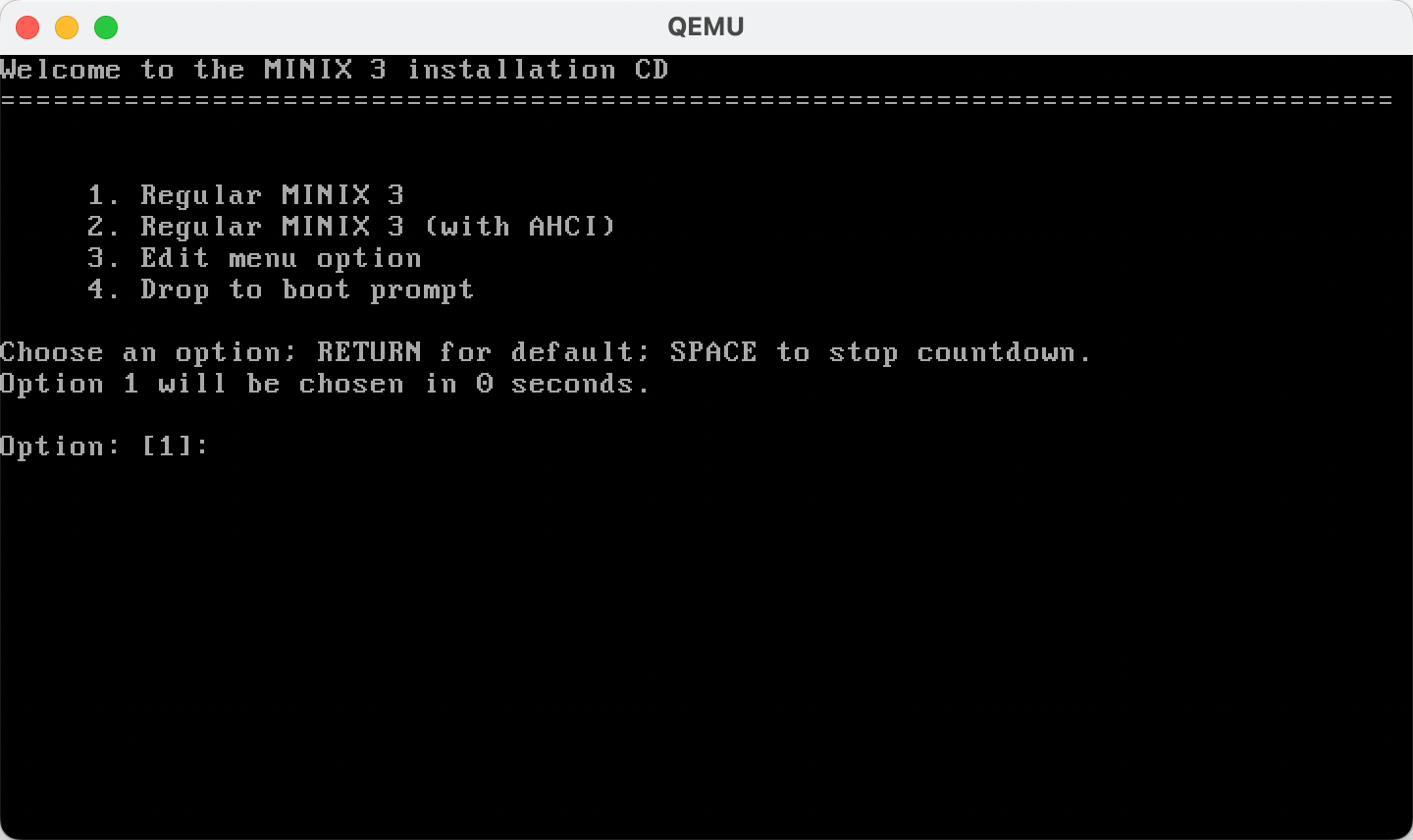
3.从光盘启动,即从iso文件启动

1
% qemu-system-x86_64 -m 256 -boot d -cdrom ./minix.iso -hda minix.img -net nic -net user

qemu-system-x86_64 - 启动一个 64 位 x86 架构的虚拟机
-m 256 - 分配 256 MB 内存给虚拟机
-boot d - 启动顺序设置为从光驱 (CD-ROM) 启动,用于第一次安装
-cdrom ./minix.iso - 指定虚拟光驱使用的 ISO 镜像文件(Minix 安装盘)
-hda minix.img - 指定虚拟硬盘文件(之前创建的 minix.img)
-net nic - 添加一块虚拟网卡
-net user - 使用用户模式网络,使虚拟机能够通过宿主机上网

从iso启动
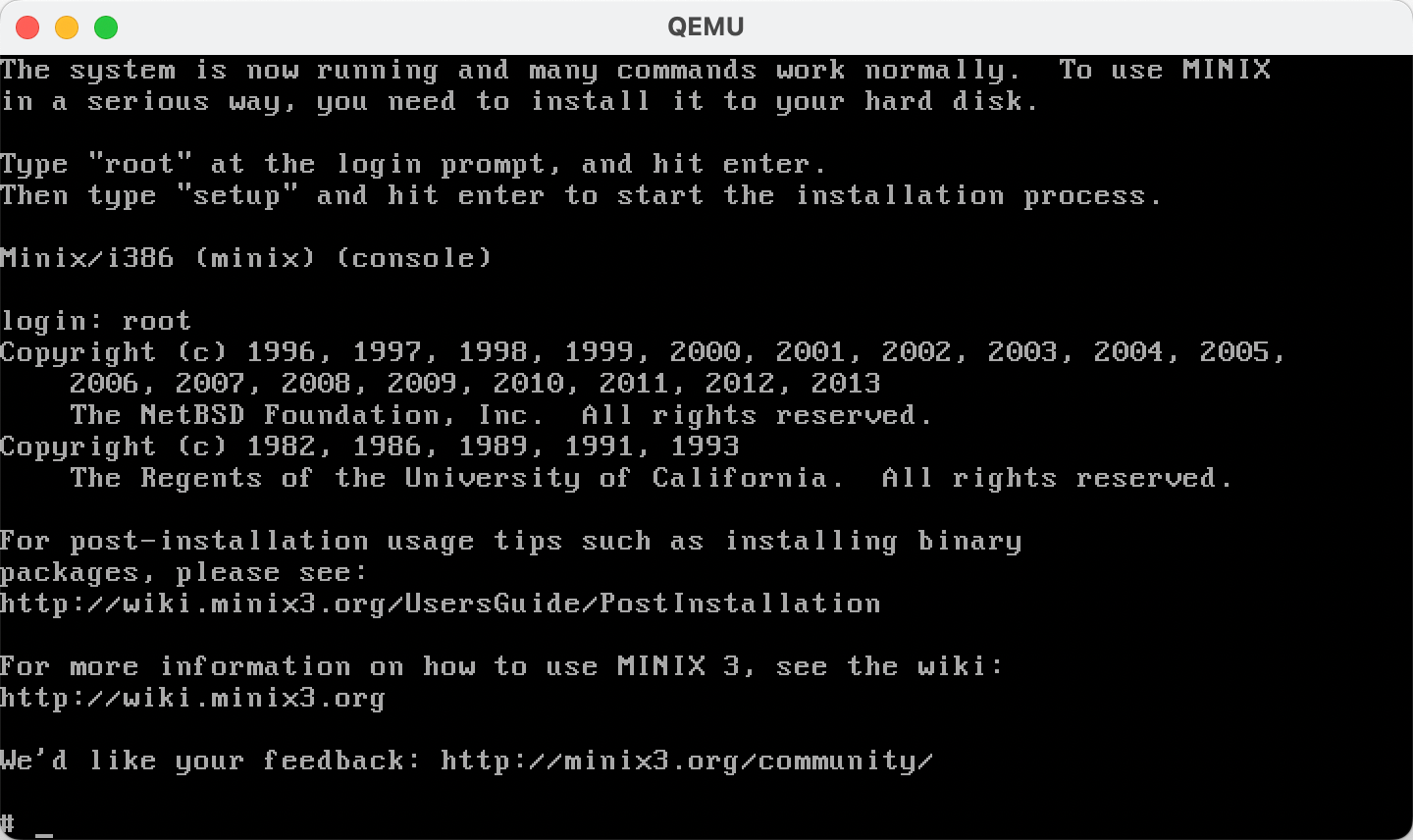
启动后登录(输入root后直接回车,无需密码)

4.执行安装

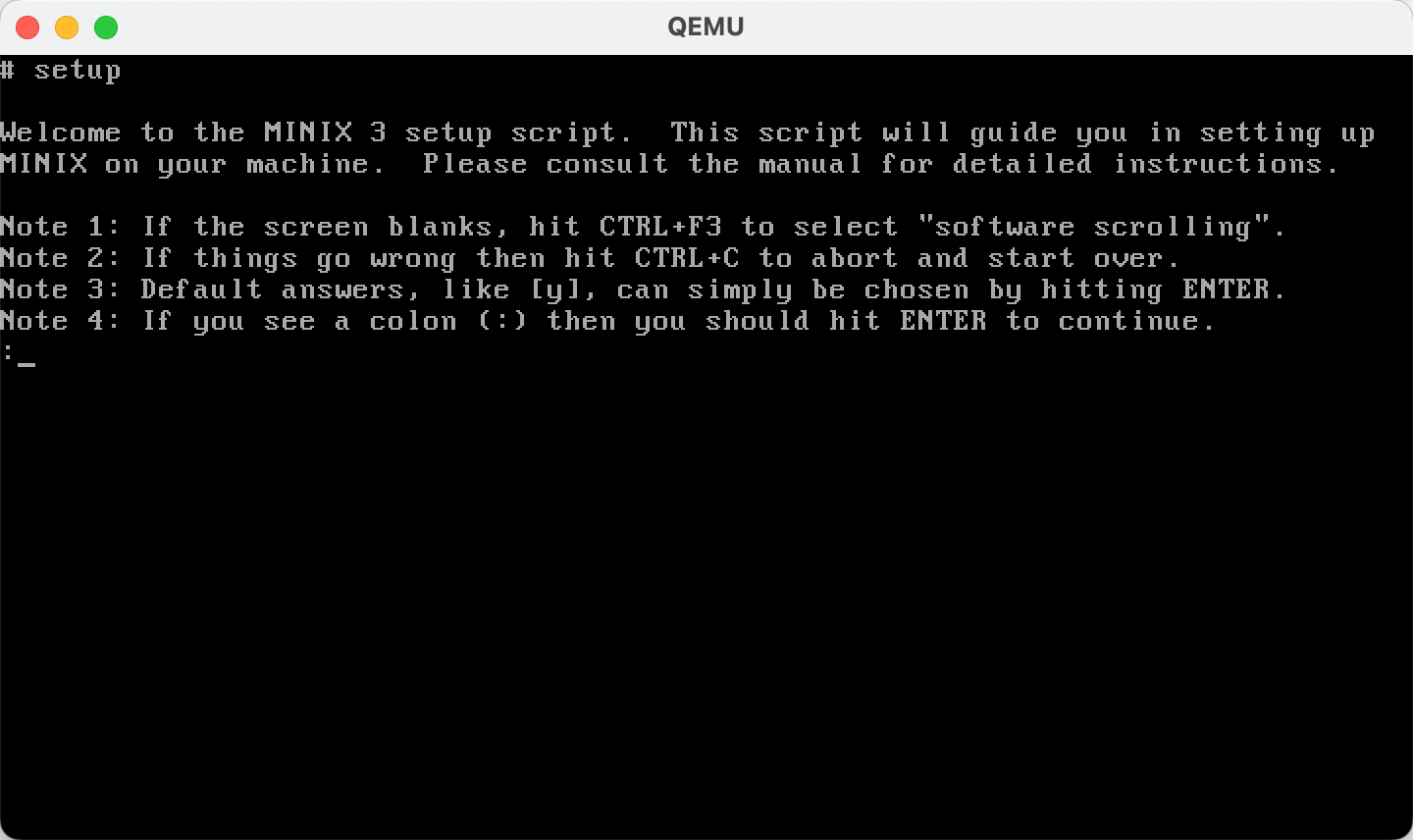
输入setup执行安装操作系统到磁盘文件;

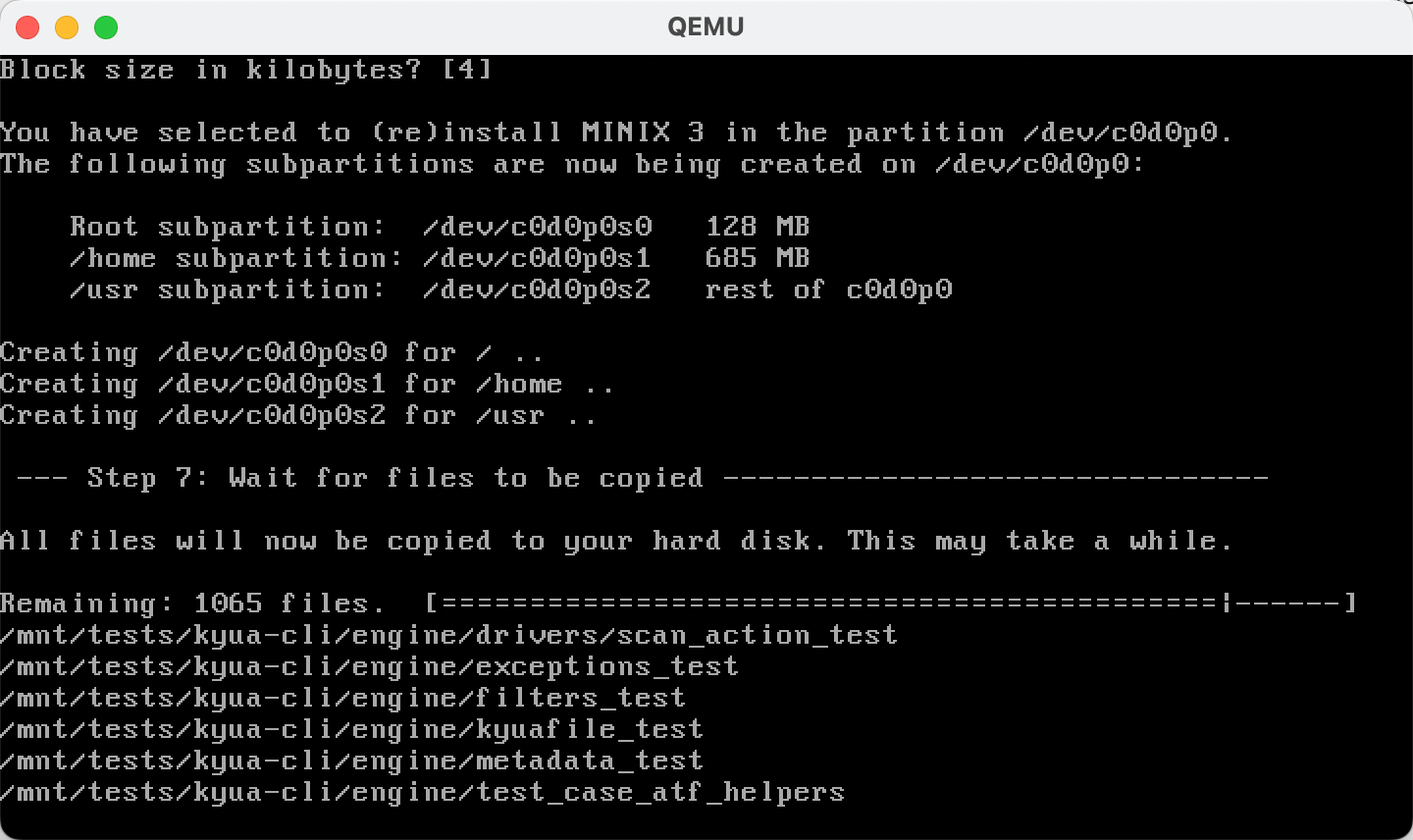
执行安装

基本上可以一路回车(按需选择),卡住的地方看下有需要输入yesno
等待一段时间,系统安装完毕;

安装过程

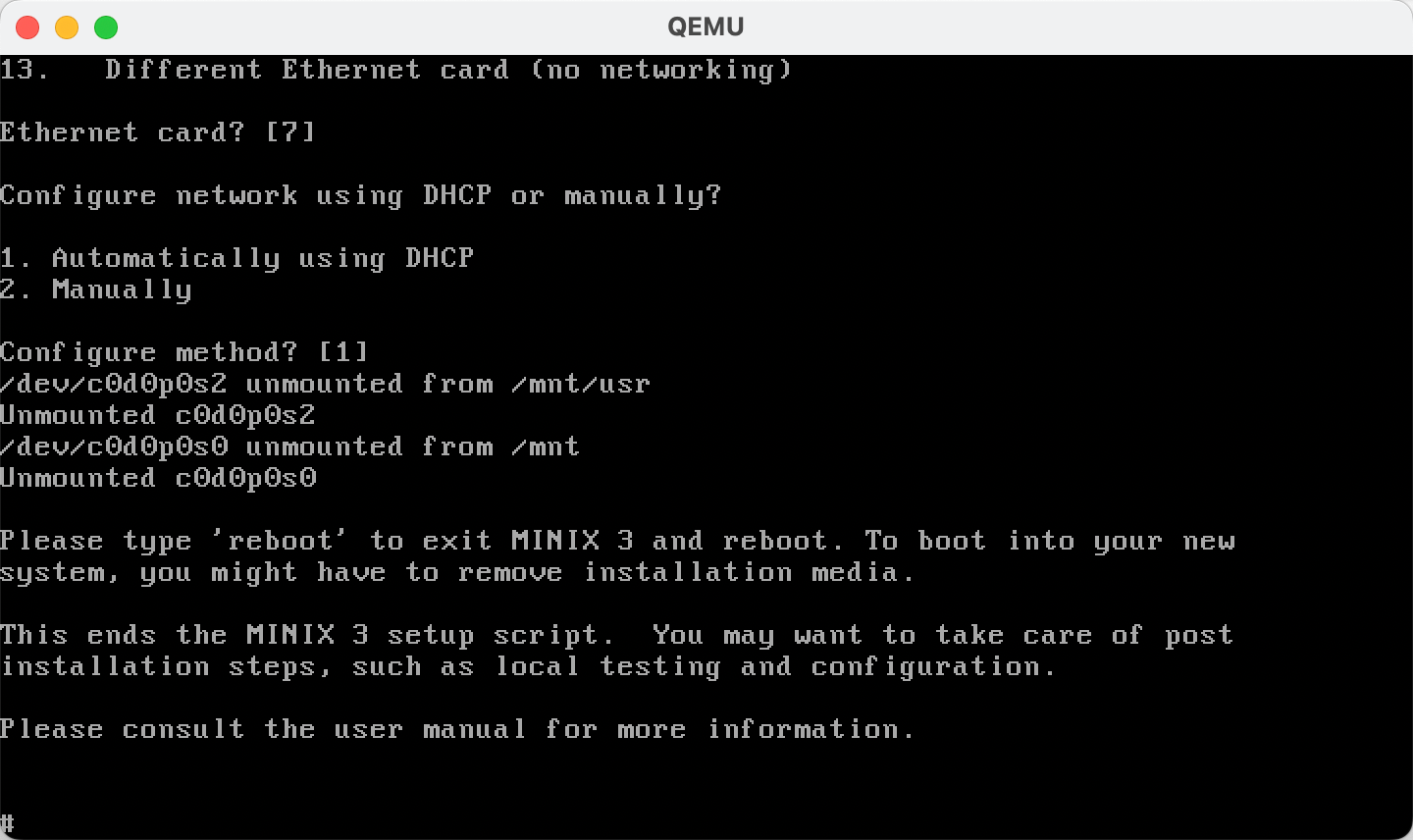
接下来还有几个选项,也可以一路回车;

安装完成

接下来输入shutdown -h now退出iso系统;
等待界面上出现MINIX has halted.表示系统已经退出的描述时,可以关闭qemu窗口。

5.从虚拟磁盘文件启动安装的操作系统

这次不指定-cdrom参数,且使用-boot c表示从硬盘(minix.img)启动;

1
% qemu-system-x86_64 -m 256 -boot c -hda minix.img -net nic -net user

qemu-system-x86_64 - 启动一个 64 位 x86 架构的虚拟机
-m 256 - 分配 256 MB 内存给虚拟机
-boot c - 设置启动顺序为从硬盘(C 盘)启动,适合系统安装完成后运行
-hda minix.img - 指定虚拟硬盘文件(之前安装了 MINIX 3 的 minix.img)
-net nic - 添加一块虚拟网卡
-net user - 使用用户模式网络,使虚拟机能够通过宿主机访问互联网

启动成功后使用root账号登录(无密码);
然后可以按需重新设置root密码;

不过还不清楚怎么在是里面配置网络,比如ping也无法成功;
留到下次有空看看吧。

参考资料#

全文检索引擎-ManticoreSearch

  • 记于:2025-09-28 下午
  • 地点:浙江省·温州市·家里
  • 天气:晴天

背景#

因个人开源的[商城项目]需要用到全文检索功能,主流的Elasticsearch太占资源,经过搜索比对,选择了轻量级的ManticoreSearch作为全文检索引擎。

简单介绍 (by AI)#

ManticoreSearch是一个开源、高性能的全文检索引擎,源自Sphinx Search。它能够帮助开发者在海量文本数据中快速查找相关内容,同时支持实时索引和SQL查询,让数据写入后即可被立即搜索。

特点包括:

  • 支持中文、英文等多语言全文搜索
  • 高并发、低延迟,适合网站、日志和内容平台
  • 使用MySQL协议,学习成本低、集成简单
  • 可进行布尔搜索、短语搜索和相关性排序

简单来说,ManticoreSearch就像一个专门为文本搜索优化的数据库,可以让你的应用或网站实现快速、精准的搜索功能。

安装#

支持多种方式安装,见官方文档[安装]部分。

MacOS下安装:

1
% brew install manticoresoftware/tap/manticoresearch manticoresoftware/tap/manticore-extra

以brew服务的方式启动Manticore:

1
% brew services start manticoresearch

支持MySQL客户端连接:

1
2
3
4
5
6
7
8
9
10
11
12
13
14
15
16
17
18
19
20
21
22
23
24
25
26
27
28
29
% mysql -h0 -P9306
Welcome to the MySQL monitor. Commands end with ; or \g.
Your MySQL connection id is 146
Server version: 0.0.0 4734be156a@250610 from tarball

Copyright (c) 2000, 2023, Oracle and/or its affiliates.

Oracle is a registered trademark of Oracle Corporation and/or its
affiliates. Other names may be trademarks of their respective
owners.

Type 'help;' or '\h' for help. Type '\c' to clear the current input statement.

mysql> show databases;
+--------------------+
| Database |
+--------------------+
| information_schema |
| Manticore |
+--------------------+
2 rows in set (0.00 sec)

mysql> show tables;
+---------+------+
| Table | Type |
+---------+------+
| product | rt |
+---------+------+
1 row in set (0.00 sec)

Manticore Search使用MySQL协议实现了一个SQL接口,允许任何MySQL库或连接器以及许多MySQL客户端连接到ManticoreSearch,并像对待MySQL服务器一样使用它,而不是Manticore。

然而,SQL方言不同,并且只实现了MySQL中可用的SQL命令或函数的子集。此外,还有专门针对ManticoreSearch的子句和函数,例如用于全文搜索的MATCH()子句。

Manticore Search不支持服务器端预处理语句,但可以使用客户端预处理语句。需要注意的是,Manticore实现了多值(MVA)数据类型,这在MySQL或实现预处理语句的库中没有等价项。在这些情况下,MVA值必须在原始查询中构造。

某些MySQL客户端/连接器需要用户/密码和/或数据库名称的值。由于Manticore Search没有数据库的概念,也没有实现用户访问控制,这些值可以随意设置,因为Manticore会简单地忽略它们。

具体见官方文档[连接服务器]部分。

集成#

ManticoreSearch支持多种编程语言的客户端连接,同时也支持Java客户端连接。
客户端Github地址:https://github.com/manticoresoftware/manticoresearch-java

但是由于我的项目使用的还是Java8,而该客户端的近几个版本已经升级了Java版本,(忘记是11还是17了);
我fork了官方该仓库,改回了Java8,并发布到了maven中央仓库;
Github地址:https://github.com/yeshimin/manticoresearch-java-8
Maven地址:https://mvnrepository.com/artifact/com.yeshimin/manticoresearch-java-8

只需要使用这个非官方的maven依赖,其他使用方式和官方的一样,无需任何改动。
版本使用8.1.1,对应官方的8.1.0。

1
2
3
4
5
6
<!-- manticoresearch 全文检索 -->
<dependency>
<groupId>com.yeshimin</groupId>
<artifactId>manticoresearch-java-8</artifactId>
<version>8.1.1</version>
</dependency>

使用示例#

表示例#

1
2
3
4
5
6
7
8
9
CREATE TABLE product (
id bigint,
product_name text,
sku_names text,
sku_specs text,
sales bigint,
sku_min_price float,
sku_max_price float
) charset_table='non_cjk' ngram_len='1' ngram_chars='cjk' morphology='stem_en' ;

配置解释:

  • charset_table=’non_cjk’:表示该表的字符集为非中文字符集,适用于英文等语言的全文检索。
  • ngram_len=’1’:表示使用1-gram分词方式,即将文本拆分为单个字符进行索引和搜索。
  • ngram_chars=’cjk’:表示对中文、日文、韩文字符进行n-gram分词处理。
  • morphology=’stem_en’:表示对英文单词进行词干提取处理,以提高搜索的匹配度。

这样配置可以支持中英文的全文检索。

代码示例#

1
2
3
4
5
6
7
8
9
10
11
12
13
14
15
16
17
18
19
20
21
22
23
24
25
26
27
28
29
30
31
32
33
34
35
36
37
38
39
40
41
42
43
44
45
46
47
48
49
50
51
52
53
54
55
56
57
58
59
60
61
62
63
64
65
66
67
68
69
70
71
72
73
74
75
76
77
78
79
80
81
82
83
84
85
86
87
88
89
90
91
92
93
94
95
96
97
98
99
100
101
102
103
104
105
106
107
108
109
110
111
112
113
114
115
116
117
118
119
120
121
122
123
124
125
126
127
128
129
130
131
132
133
134
135
136
137
138
139
140
141
142
143
144
145
146
147
148
149
150
151
152
153
154
155
156
157
158
159
160
161
162
163
164
165
166
167
168
169
170
171
package com.yeshimin.yeahboot.merchant.service;

import cn.hutool.core.util.StrUtil;
import com.manticoresearch.client.ApiClient;
import com.manticoresearch.client.ApiException;
import com.manticoresearch.client.api.IndexApi;
import com.manticoresearch.client.api.SearchApi;
import com.manticoresearch.client.model.*;
import com.yeshimin.yeahboot.common.common.consts.FulltextTableConsts;
import com.yeshimin.yeahboot.common.common.properties.ManticoreSearchProperties;
import com.yeshimin.yeahboot.data.domain.entity.ProductSpuEntity;
import lombok.RequiredArgsConstructor;
import lombok.extern.slf4j.Slf4j;
import org.springframework.stereotype.Service;

import java.util.HashMap;
import java.util.List;
import java.util.Map;

@Slf4j
@Service
@RequiredArgsConstructor
public class FullTextSearchService {

private final ManticoreSearchProperties properties;

/**
* 同步商品索引
*/
public void syncProduct(ProductSpuEntity productSpu, List<String> skuNames, List<String> skuSpecs, boolean update) {
Map<String, Object> doc = new HashMap<>();
doc.put("id", productSpu.getId());
doc.put("product_name", productSpu.getName());
doc.put("sku_names", StrUtil.join(" ", skuNames));
doc.put("sku_specs", StrUtil.join(" ", skuSpecs));
doc.put("sales", productSpu.getSales());
doc.put("sku_min_price", productSpu.getMinPrice());
doc.put("sku_max_price", productSpu.getMaxPrice());

if (update) {
this.replace(FulltextTableConsts.PRODUCT, doc);
} else {
this.insert(FulltextTableConsts.PRODUCT, doc);
}
}

// ================================================================================

/**
* search
*/
public SearchResponse search(String tableName, String queryString) {
ApiClient client = this.newClient();

SearchQuery searchQuery = new SearchQuery();
searchQuery.setQueryString(queryString);

SearchRequest searchRequest = new SearchRequest();
searchRequest.table(tableName).query(searchQuery);

SearchApi searchApi = new SearchApi(client);

try {
SearchResponse response = searchApi.search(searchRequest);
log.debug("Search response: {}", response);
return response;
} catch (ApiException e) {
this.printError(e);
throw new RuntimeException(e);
}
}

/**
* insert
*/
public SuccessResponse insert(String tableName, Map<String, Object> doc) {
ApiClient client = this.newClient();

Long id = Long.parseLong(doc.remove("id").toString());

InsertDocumentRequest request = new InsertDocumentRequest();
request.table(tableName).id(id).doc(doc);

IndexApi indexApi = new IndexApi(client);
try {
SuccessResponse response = indexApi.insert(request);
log.debug("Insert response: {}", response);
return response;
} catch (ApiException e) {
this.printError(e);
throw new RuntimeException(e);
}
}

/**
* replace
*/
public SuccessResponse replace(String tableName, Map<String, Object> doc) {
ApiClient client = this.newClient();

Long id = Long.parseLong(doc.remove("id").toString());

InsertDocumentRequest request = new InsertDocumentRequest();
request.table(tableName).id(id).doc(doc);

IndexApi indexApi = new IndexApi(client);
try {
SuccessResponse response = indexApi.replace(request);
log.debug("Replace response: {}", response);
return response;
} catch (ApiException e) {
this.printError(e);
throw new RuntimeException(e);
}
}

/**
* update
*/
public UpdateResponse update(String tableName, Map<String, Object> doc) {
ApiClient client = this.newClient();

Long id = Long.parseLong(doc.remove("id").toString());

UpdateDocumentRequest updateRequest = new UpdateDocumentRequest();
updateRequest.table(tableName).id(id).doc(doc);

IndexApi indexApi = new IndexApi(client);
try {
UpdateResponse response = indexApi.update(updateRequest);
log.debug("Update response: {}", response);
return response;
} catch (ApiException e) {
this.printError(e);
throw new RuntimeException(e);
}
}

/**
* deleteIndex
*/
public DeleteResponse deleteIndex(String tableName, Long id) {
ApiClient client = this.newClient();

DeleteDocumentRequest deleteRequest = new DeleteDocumentRequest();
deleteRequest.table(tableName).id(id);

IndexApi indexApi = new IndexApi(client);
try {
DeleteResponse response = indexApi.delete(deleteRequest);
log.debug("Delete response: {}", response);
return response;
} catch (ApiException e) {
this.printError(e);
throw new RuntimeException(e);
}
}

// ================================================================================

private ApiClient newClient() {
ApiClient client = new ApiClient();
client.setBasePath(properties.getBasePath());
return client;
}

private void printError(ApiException e) {
log.error("Exception when calling Api function: {}, Status code: {}, Reason: {}, Response headers: {}",
e.getMessage(), e.getCode(), e.getResponseBody(), e.getResponseHeaders());
}
}

官方建议:Java客户端SDK未实现线程安全,建议每次请求都创建一个新的ApiClient实例。

参考资料#

内网穿透-frp

记于:2025-09-20 下午
地点:浙江省·温州市·家里
天气:阴天

简单介绍 (by 官网)#

frp 是一个专注于内网穿透的高性能的反向代理应用,支持 TCP、UDP、HTTP、HTTPS 等多种协议,且支持 P2P 通信。可以将内网服务以安全、便捷的方式通过具有公网 IP 节点的中转暴露到公网。

下载#

Github上下载对应平台的二进制包,解压即可使用。
注意:服务端和客户端需要下载对应的平台版本。

服务端部署#

1
# cat /etc/systemd/system/frps.service 
1
2
3
4
5
6
7
8
9
10
11
12
13
[Unit]
# 服务名称,可自定义
Description = frp server
After = network.target syslog.target
Wants = network.target

[Service]
Type = simple
# 启动frps的命令,需修改为您的frps的安装路径
ExecStart = /path/to/frps -c /path/to/frps.toml

[Install]
WantedBy = multi-user.target
1
2
systemctl start frps
systemctl enable frps

服务端frps.toml配置

1
bindPort = 7000

客户端部署
客户端frpc.toml配置

1
2
3
4
5
6
7
8
9
serverAddr = "此处填写部署frps的公网IP"
serverPort = 7000

[[proxies]]
name = "note"
type = "tcp"
localIP = "127.0.0.1"
localPort = 1111
remotePort = 6000

serverAddrserverPort配置为服务端frps的公网IP和端口;
localIPlocalPort配置为需要内网穿透的服务地址和端口;
remotePort配置为服务端开放的端口,外网访问该端口即访问内网服务(即外网6000端转发到本地1111端口)。

启动客户端

1
2
3
4
5
6
# ./frpc -c ./frpc.toml
2025-09-20 17:25:13.467 [I] [sub/root.go:149] start frpc service for config file [./frpc.toml]
2025-09-20 17:25:13.468 [I] [client/service.go:319] try to connect to server...
2025-09-20 17:25:13.575 [I] [client/service.go:311] [e33931d2705928f7] login to server success, get run id [e33931d2705928f7]
2025-09-20 17:25:13.576 [I] [proxy/proxy_manager.go:177] [e33931d2705928f7] proxy added: [note]
2025-09-20 17:25:13.605 [I] [client/control.go:172] [e33931d2705928f7] [note] start proxy success

访问外网frps的ip+6000端口即可访问内网服务。


另外还有其他场景示例,见官方文档

参考资料#

Spring AI MCP

记于:2025-08-18 下午
地点:浙江省·温州市·家里
天气:晴天

背景#

因项目需要,使用到mcp。

简单介绍 (by AI)#

MCP,全称 Model Context Protocol,是一种用于 大模型与外部服务交互 的协议。它的核心价值在于:
标准化:定义了一致的通信方式,避免为每个外部服务重复造轮子。
多通道支持:可通过 stdio、SSE(Server-Sent Events) 等传输方式进行通信,满足不同运行环境需求。
插件化:MCP Server 可以像插件一样挂载到模型环境中,模型通过协议与之交互,从而获取外部数据或执行操作。
简单来说,MCP 让 模型与外部世界的连接 更加轻量、统一和可扩展。

大致流程#

智能体中配置mcp插件工具,运行智能体,与智能体中d大型对话时,可让其调用mcp插件工具执行相关操作,比如获取当前天气信息,用于接下来的出行任务规划。
上述只是简单的流程描述,具体可以有多种多样的流程与应用方式。

代码和配置#

附上主要代码片段,并做一定说明。

1
2
3
4
5
6
7
8
9
10
11
12
13
14
@Slf4j
@Service
public class WeatherMcpService {

/**
* tool: query weather info by city name
*/
@Tool(description = "query weather info by city name")
public String queryWeatherInfo(@ToolParam(required = true, description = "city name") String city) {
String weatherInfo = weatherInfoService.getWeatherInfo(city);
log.info("queryWeatherInfo result: {}", weatherInfo);
return weatherInfo;
}
}

这个mcp工具的作用是查询天气信息。
@Tool注解表示该方法是一个mcp工具方法;
@ToolParam注解用于定义工具方法的参数;

1
2
3
4
5
6
7
8
@Configuration
public class McpServerConfiguration {

@Bean
public ToolCallbackProvider weatherTools(WeatherMcpService weatherMcpService) {
return MethodToolCallbackProvider.builder().toolObjects(weatherMcpService).build();
}
}

该类用于配置MCP服务。

1
2
3
4
5
6
7
8
9
10
11
spring:
main:
banner-mode: off
ai:
mcp:
server:
# server.stdio: false # 如果需要可以取消注释
name: my-mcp-server
base-url: /admin
sse-message-endpoint: /mcp/message
version: 1.0.0

这是spring ai mcp server的基本配置。
末尾附上spring ai mcp server官方文档链接。

调试工具#

mcp协议官方提供一个调试mcp server的命令行具;
示例:

1
2
3
4
5
6
7
8
9
10
% npx -y @modelcontextprotocol/inspector
Starting MCP inspector...
⚙️ Proxy server listening on 127.0.0.1:6277
⚠️ WARNING: Authentication is disabled. This is not recommended.
🔍 MCP Inspector is up and running at http://127.0.0.1:6274 🚀
New SSE connection request. NOTE: The sse transport is deprecated and has been replaced by StreamableHttp
Query parameters: {"url":"http://localhost:9999/admin/sse","transportType":"sse"}
SSE transport: url=http://localhost:9999/admin/sse, headers={"Accept":"text/event-stream"}
Created client transport
Created server transport

执行上述命令后,打开http://127.0.0.1:6274进行配置、连接和调试。

注意点(重点)#

  • 如果有用到nginx,需要在location部分添加相关配置

    1
    2
    3
    4
    proxy_buffering off;
    proxy_cache off;
    proxy_read_timeout 3600s;
    proxy_send_timeout 3600s;
  • spring boot项目如果配置了context-path,需要在MCP Server的配置中将base-url设置为相应的context-path
    比如context-path: /admin,需要同时设置spring.ai.mcp.server.base-url: /admin
    另外nginx如果还有前缀(非项目本身路径),比如/api,spring.ai.mcp.server.base-url还需要添加/api前缀,比如:/api/admin
    否则会连不上。

  • 还有mcp调试工具经常出现自动断开的问题

    1
    2
    3
    4
    5
    6
    7
    8
    9
    10
    11
    12
    13
    14
    15
    Error from MCP server: SseError: SSE error: TypeError: terminated: other side closed
    at _eventSource.onerror (file:///Users/yeshimin/.npm/_npx/5a9d879542beca3a/node_modules/@modelcontextprotocol/sdk/dist/esm/client/sse.js:82:31)
    at EventSource.scheduleReconnect_fn (file:///Users/yeshimin/.npm/_npx/5a9d879542beca3a/node_modules/eventsource/dist/index.js:248:53)
    at file:///Users/yeshimin/.npm/_npx/5a9d879542beca3a/node_modules/eventsource/dist/index.js:98:174
    at process.processTicksAndRejections (node:internal/process/task_queues:95:5) {
    code: undefined,
    event: {
    type: 'error',
    message: 'TypeError: terminated: other side closed',
    code: undefined,
    defaultPrevented: false,
    cancelable: false,
    timeStamp: 215334173.374333
    }
    }

    这个也是添加了nginx的proxy_read_timeoutproxy_write_timeout可以解决;
    但是出现了另外的问题:

    1
    2
    3
    4
    5
    6
    7
    8
    9
    10
    11
    12
    13
    14
    15
    Error from MCP server: SseError: SSE error: TypeError: terminated: Body Timeout Error
    at _eventSource.onerror (file:///Users/yeshimin/.npm/_npx/5a9d879542beca3a/node_modules/@modelcontextprotocol/sdk/dist/esm/client/sse.js:82:31)
    at EventSource.scheduleReconnect_fn (file:///Users/yeshimin/.npm/_npx/5a9d879542beca3a/node_modules/eventsource/dist/index.js:248:53)
    at file:///Users/yeshimin/.npm/_npx/5a9d879542beca3a/node_modules/eventsource/dist/index.js:98:174
    at process.processTicksAndRejections (node:internal/process/task_queues:95:5) {
    code: undefined,
    event: {
    type: 'error',
    message: 'TypeError: terminated: Body Timeout Error',
    code: undefined,
    defaultPrevented: false,
    cancelable: false,
    timeStamp: 320434.630833
    }
    }

    这个问了AI,说是长时间未收到服务端的心跳或响应,导致客户端主动断开,该问题暂未解决。

其他#

  • maven配置参考Spring AI Examples项目,包括带鉴权的方式,见下方参考资料;
  • spring ai当前版本1.0.1,还不支持StreamableHttp方式,目前仅支持SSE方式;
  • 智能体的mcp插件集成此处做说明,见具体智能体的文档;

参考资料#

多系统(模块/主题)、多终端的token控制方案

记于:2025-07-28 晚上
地点:浙江省·温州市·家里
天气:雨天

背景#

在做自己的开源Java/Spring Boot脚手架项目(地址见末尾);
默认实现为一个帐号对应一个token,web端和api端相互占用,开发和调试不方便,所以把token控制方案实现提前了一些。

功能说明#

  • 支持多系统(模块/主题),此处系统可以是一个项目工程的各个子系统,比如一个商城系统下的管理端、商家端、用户端等;
  • 支持多终端,比如web端、api端、app端(具体可分为phone端、pad端等);
  • 支持针对不同系统、不同终端配置不同的token策略,比如token过期时间、最大在线token数、最大在线终端数等;

设计思路#

  • 认证和方案总体基于spring security;
  • 在各终端执行登录操作时,对token进行控制,token空位足够则直接添加,否则进行淘汰后再添加;
  • token控制依赖缓存中token多个数据结构存储、操作、与过期机制;
  • token的鉴权,则通过过滤器机制实现;

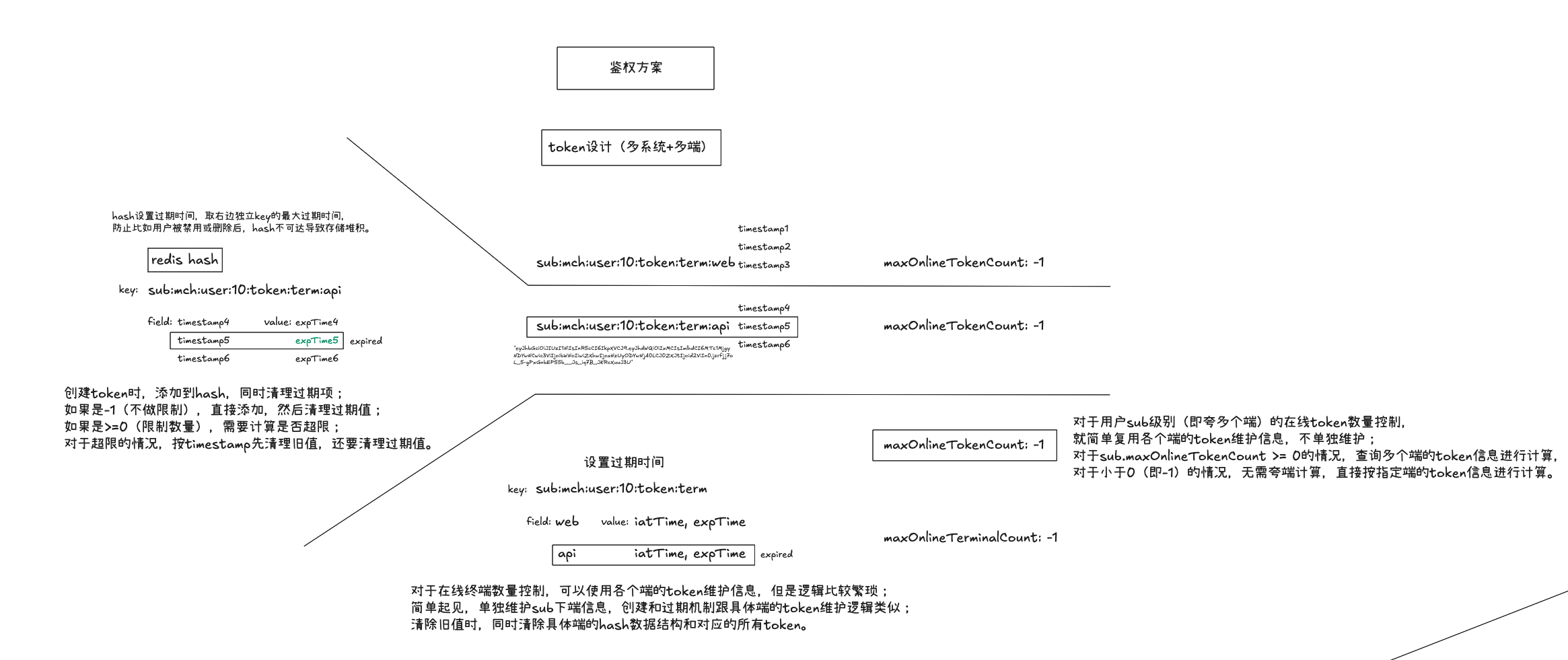
设计图#

该设计图为草图,暂不做细化,对设计有个概念即可,具体看代码实现。

token控制方案设计图

代码实现#

附上主要代码片段,并做一定说明。

配置#

1
2
3
4
5
6
7
8
9
10
11
12
13
14
15
16
17
18
19
20
21
22
23
24
25
26
27
28
29
30
31
32
33
34
35
36
37
38
39
40
41
42
43
44
45
46
47
48
49
# auth相关
auth:
token:
# 全局jwt配置(subject中可覆盖)
jwt:
# 签发密钥
secret: xeePu3xo3uoyo5Quooquai0ut1ha7aih
# 过期时间(秒)
expire-seconds: 3600
# 时间校验偏差(秒)
default-leeway: 60
subjects:
- name: admin
api-prefix: '/admin'
jwt:
# 签发密钥
secret: wee8Deonee4egh5taif8noim8pee1aiJ
# 过期时间(秒)
expire-seconds: 3600
# 时间校验偏差(秒)
default-leeway: 60
terminals:
- name: web
# 同一个账号在该终端的最大在线token数量(默认-1,表示不限制)(不可超过总的最大在线token数量)
max-online-token-count: 1
- name: api
# 同一个账号在该终端的最大在线token数量(默认-1,表示不限制)(不可超过总的最大在线token数量)
max-online-token-count: -1
# 同一个账号的最大在线token数量(默认-1,表示不限制)
max-online-token-count: 10
# 同一个账号的最大在线终端数量(默认-1,表示不限制)
max-online-terminal-count: -1
- name: app
api-prefix: /app
jwt:
# 签发密钥
secret: caiQueipae5Phaeph7gaethae5ash6bu
# 过期时间(秒)
expire-seconds: 3600
# 时间校验偏差(秒)
default-leeway: 60
terminals:
- name: app
# 同一个账号在该终端的最大在线token数量(默认-1,表示不限制)(不可超过总的最大在线token数量)
max-online-token-count: 1
# 同一个账号的最大在线token数量(默认-1,表示不限制)
max-online-token-count: 10
# 同一个账号的最大在线终端数量(默认-1,表示不限制)
max-online-terminal-count: -1

配置中包含secret,由于是开源项目,所以不做脱敏处理;
配置含义见注释和代码,不另做说明。

登录操作中的token控制逻辑#

已封装为单独服务类的方法:

1
2
3
4
5
6
7
8
9
10
11
12
13
14
15
16
17
18
19
20
21
22
23
24
25
26
27
28
29
30
31
32
33
34
35
36
37
38
39
40
41
42
43
44
45
46
47
48
49
50
51
52
53
54
55
56
57
58
59
60
61
62
63
64
65
66
67
68
69
70
71
72
73
74
75
76
77
78
79
80
81
82
83
84
85
86
87
88
89
90
91
92
93
94
95
96
97
98
99
100
101
102
103
104
105
106
107
108
109
110
111
112
113
114
115
116
117
118
119
120
121
122
123
124
125
126
127
128
129
130
131
132
133
134
135
136
137
138
139
140
141
142
143
144
145
146
147
148
149
150
151
152
153
154
155
156
157
158
159
160
161
162
163
164
165
166
167
168
169
170
171
172
173
174
175
176
177
178
179
180
181
182
183
184
185
186
187
188
189
190
191
192
193
194
195
196
197
198
199
200
201
202
203
204
205
206
207
208
209
210
211
212
213
214
215
216
217
218
219
220
221
222
223
224
225
226
227
228
229
230
231
232
233
234
235
236
237
238
239
240
241
242
243
244
245
246
247
248
249
250
251
252
253
254
255
/**
* 终端和token控制服务
*/
@Service
@RequiredArgsConstructor
public class TerminalAndTokenControlService {

private final TokenService tokenService;
private final CacheService cacheService;
private final JwtService jwtService;

private final AuthTokenProperties authTokenProperties;

/**
* 控制终端和token数量
*/
public String doControl(String userId, String subValue, String termValue) {
// 检查配置
AuthTokenProperties.Subject subject = authTokenProperties.getMapSubject().get(subValue);
if (subject == null) {
throw new BaseException(ErrorCodeEnum.FAIL, "subject[" + subValue + "] 未配置");
}
AuthTokenProperties.Terminal terminal = subject.getMapTerminal().get(termValue);
if (terminal == null) {
throw new BaseException(ErrorCodeEnum.FAIL, "terminal[" + termValue + "] 不正确");
}

// 1.检查配置
// --------------------------------------------------------------------------------
// 2.加载缓存数据并做初预处理

// 添加token及终端信息
String token = tokenService.generateToken(userId, subValue, termValue);
JwtPayloadVo jwtPayloadVo = jwtService.decodePayload(token);
// token创建时间戳(毫秒)
long timestampMs = jwtPayloadVo.getIatMs();

// 查询终端信息
Map<String, String> mapTerminalInfo = tokenService.getSubjectTerminalInfo(subValue, userId);
Map<String, String> mapTerminalInfoValid = new HashMap<>();
Map<String, String> mapTerminalInfoExpired = new HashMap<>();
// 区分是否过期
mapTerminalInfo.forEach((term, termInfo) -> {
// termInfo格式为 "iat,expTime",其中iat为登录时间戳,expTime为过期时间戳
long expTime = Long.parseLong(termInfo.split(",")[1]);
if (timestampMs >= expTime) {
mapTerminalInfoExpired.put(term, termInfo);
} else {
mapTerminalInfoValid.put(term, termInfo);
}
});
// 查询终端对应的token信息
Map<String, Map<String, String>> mapTotalTerminalTokenInfo = new HashMap<>();
Map<String, Map<String, String>> mapRemainTerminalTokenInfo = new HashMap<>();
Map<String, String> mapTotalTerminalTokenInfoValid = new HashMap<>();
Map<String, String> mapTotalTerminalTokenInfoExpired = new HashMap<>();
for (Map.Entry<String, String> entry : mapTerminalInfo.entrySet()) {
// 查询对应终端的token信息
Map<String, String> mapTerminalTokenInfo = tokenService.getTerminalTokenInfo(subValue, userId, entry.getKey());
mapTotalTerminalTokenInfo.put(entry.getKey(), mapTerminalTokenInfo);
}
// 查询当前终端的token信息
Map<String, String> mapTerminalTokenInfo = mapTotalTerminalTokenInfo.getOrDefault(termValue, new HashMap<>());
Map<String, String> mapTerminalTokenInfoValid = new HashMap<>();
Map<String, String> mapTerminalTokenInfoExpired = new HashMap<>();
mapTerminalTokenInfo.forEach((timestamp, expTime) -> {
long expTimeInt = Long.parseLong(expTime);
if (timestampMs >= expTimeInt) {
mapTerminalTokenInfoExpired.put(timestamp, expTime);
} else {
mapTerminalTokenInfoValid.put(timestamp, expTime);
}
});

// 2.加载缓存数据并做初预处理
// --------------------------------------------------------------------------------
// 3.检查和控制subject下终端数量

// 是否清空用户的终端和token信息
boolean clearAllTerminal = false;
// 要清除的终端信息
Set<String> needDeleteTerminal = new HashSet<>();
// 要清除的token信息,map<terminal, set<timestamp>> ; 【保留终端token信息】中的待清除部分
Map<String, Set<String>> mapNeedDeleteTokenInfo = new HashMap<>();

// 检查和控制终端数
// 大于0,需要检查和控制超限情况
if (subject.getMaxOnlineTerminalCount() > 0) {
// 检查当前在线终端数是否达到限制
int occurTerminalCount = mapTerminalInfoValid.size() + (mapTerminalInfoValid.containsKey(termValue) ? 0 : 1);
// 超限情况
if (occurTerminalCount > subject.getMaxOnlineTerminalCount()) {
// 要清除的终端数
int needToDeleteTerminalCount = occurTerminalCount - subject.getMaxOnlineTerminalCount();
// 优先清除旧值
// mapTerminalInfoValid按value[0]时间戳排序,value[0]越小越旧;
// value数据格式为iat,expTime,直接按value字符串排序效果与按iat排序一样
Set<String> eliminatedTerminal = mapTerminalInfoValid.entrySet()
.stream().sorted(Map.Entry.comparingByValue()).limit(needToDeleteTerminalCount)
.map(Map.Entry::getKey).collect(Collectors.toSet());
// 记录要清除的终端信息
needDeleteTerminal.addAll(eliminatedTerminal);
}
} else if (subject.getMaxOnlineTerminalCount() == 0) {
clearAllTerminal = true;
}
// 添加过期终端
needDeleteTerminal.addAll(mapTerminalInfoExpired.keySet());

// 3.检查和控制subject下终端数量
// --------------------------------------------------------------------------------
// 4.检查和控制subject下token数量

// 检查和控制token信息
// 大于0,需要检查和控制超限情况
if (subject.getMaxOnlineTokenCount() > 0) {
// 计算当前有效token数量(排除掉要清除的终端,即只计算要保留的终端)
int occurTokenCount = 0;
mapRemainTerminalTokenInfo = mapTotalTerminalTokenInfo.entrySet().stream()
.filter(entry -> !needDeleteTerminal.contains(entry.getKey()))
.collect(Collectors.toMap(Map.Entry::getKey, Map.Entry::getValue));
for (Map.Entry<String, Map<String, String>> entry : mapRemainTerminalTokenInfo.entrySet()) {
occurTokenCount += entry.getValue().size();
// 区分是否过期
entry.getValue().forEach((timestamp, expTime) -> {
long expTimeInt = Long.parseLong(expTime);
if (timestampMs >= expTimeInt) {
mapTotalTerminalTokenInfoExpired.put(timestamp + "," + entry.getKey(), expTime);
} else {
mapTotalTerminalTokenInfoValid.put(timestamp + "," + entry.getKey(), expTime);
}
});
}
// 超限的情况
if (occurTokenCount >= subject.getMaxOnlineTokenCount()) {
// 计算需要清除的token数量;+1是为当前登录操作预留的token位置
int needDeleteCount = occurTokenCount - subject.getMaxOnlineTokenCount() + 1;
// 优先清除旧值
Set<String> eliminatedTokenInfo = mapTotalTerminalTokenInfoValid.entrySet()
.stream().sorted((e1, e2) -> {
String terminal1 = e1.getKey().split(",")[1];
int sort = Objects.equals(terminal1, termValue) ? 0 : 1;
String key1 = sort + ":" + e1.getKey();

String terminal2 = e2.getKey().split(",")[1];
sort = Objects.equals(terminal2, termValue) ? 0 : 1;
String key2 = sort + ":" + e2.getKey();

return key1.compareTo(key2);
}).limit(needDeleteCount)
.map(Map.Entry::getKey).collect(Collectors.toSet());
eliminatedTokenInfo.forEach(e -> {
// [0]: timestamp; [1]: terminal
String[] split = e.split(",");
mapNeedDeleteTokenInfo.computeIfAbsent(split[1], k -> new HashSet<>()).add(split[0]);
});
}
} else if (subject.getMaxOnlineTokenCount() == 0) {
clearAllTerminal = true;
}
// 过期token信息的也添加到待清除集合
mapTotalTerminalTokenInfoExpired.keySet().forEach(e -> {
// [0]: timestamp; [1]: terminal
String[] split = e.split(",");
mapNeedDeleteTokenInfo.computeIfAbsent(split[1], k -> new HashSet<>()).add(split[0]);
});

// 4.检查和控制subject下token数量
// --------------------------------------------------------------------------------
// 5.检查和控制terminal下token数量

// 检查和控制当前用户登录终端对应的token信息
// 仅当当前终端不包含在待删除终端集合内,才进行处理
if (!needDeleteTerminal.contains(termValue)) {
// 大于0,需要检查和控制超限情况
if (terminal.getMaxOnlineTokenCount() > 0) {
// 超限的情况
if (mapTerminalTokenInfoValid.size() >= terminal.getMaxOnlineTokenCount()) {
// 需要清除的token数量;+1是为当前登录操作预留的token位置
int needDeleteCount = mapTerminalTokenInfoValid.size() - terminal.getMaxOnlineTokenCount() + 1;
// 优先清除旧值
Set<String> eliminatedToken = mapTerminalTokenInfoValid.entrySet()
.stream().sorted(Map.Entry.comparingByKey()).limit(needDeleteCount)
.map(Map.Entry::getKey).collect(Collectors.toSet());
eliminatedToken.forEach(timestamp -> {
mapNeedDeleteTokenInfo.computeIfAbsent(termValue, k -> new HashSet<>()).add(timestamp);
});
}
} else if (terminal.getMaxOnlineTokenCount() == 0) {
// 清空当前终端和对应token信息
needDeleteTerminal.add(termValue);
}
// 过期的token信息也添加到待清除集合
mapTerminalTokenInfoExpired.keySet().forEach(timestamp -> {
mapNeedDeleteTokenInfo.computeIfAbsent(termValue, k -> new HashSet<>()).add(timestamp);
});
}

// 5.检查和控制terminal下token数量
// --------------------------------------------------------------------------------
// 6.执行清除操作并按需添加当前登录的终端和token信息

// 清空用户所有终端和token信息
if (clearAllTerminal) {
Set<String> delKeys = new HashSet<>();
delKeys.add(String.format(CacheKeyConsts.USER_SUBJECT_TERMINAL_INFO, subValue, userId));
mapTerminalInfo.keySet().forEach(term -> {
delKeys.add(String.format(CacheKeyConsts.USER_TERMINAL_TOKEN_INFO, subValue, userId, term));
mapTotalTerminalTokenInfo.getOrDefault(term, new HashMap<>()).forEach((timestamp, expTime) -> {
delKeys.add(String.format(CacheKeyConsts.USER_TERMINAL_TOKEN, subValue, userId, term, timestamp));
});
});
cacheService.delete(delKeys.toArray(new String[0]));
// 禁止登录
throw new BaseException("禁止登录");
}
// (按需)清空部分信息,然后添加当前登录所创建的token及终端信息
else {
Set<String> delKeys = new HashSet<>();
// map<cache key, fields>
Map<String, Set<String>> delFields = new HashMap<>();

needDeleteTerminal.forEach(term -> {
delFields.computeIfAbsent(String.format(CacheKeyConsts.USER_SUBJECT_TERMINAL_INFO, subValue, userId),
k -> new HashSet<>()).add(term);

delKeys.add(String.format(CacheKeyConsts.USER_TERMINAL_TOKEN_INFO, subValue, userId, term));
Optional.ofNullable(mapTotalTerminalTokenInfo.get(term)).ifPresent(terminalTokenInfo -> {
terminalTokenInfo.keySet().forEach(timestamp -> {
delFields.computeIfAbsent(String.format(CacheKeyConsts.USER_TERMINAL_TOKEN_INFO, subValue, userId, term),
k -> new HashSet<>()).add(timestamp);
delKeys.add(String.format(CacheKeyConsts.USER_TERMINAL_TOKEN, subValue, userId, term, timestamp));
});
});
});
mapNeedDeleteTokenInfo.forEach((term, timestampSet) -> {
delFields.computeIfAbsent(String.format(CacheKeyConsts.USER_TERMINAL_TOKEN_INFO, subValue, userId, term),
k -> new HashSet<>()).addAll(timestampSet);
timestampSet.forEach(timestamp -> {
delKeys.add(String.format(CacheKeyConsts.USER_TERMINAL_TOKEN, subValue, userId, term, timestamp));
});
});
// 执行清除
cacheService.delete(delKeys.toArray(new String[0]));
delFields.forEach((cacheKey, fields) -> {
cacheService.deleteHashFields(cacheKey, fields.toArray(new Object[0]));
});

tokenService.setSubjectTerminalInfo(subValue, userId, termValue, jwtPayloadVo.getIatMs(), jwtPayloadVo.getExpMs());
tokenService.setTerminalTokenInfo(subValue, userId, termValue, jwtPayloadVo.getIatMs(), jwtPayloadVo.getExpMs());
tokenService.cacheToken(subValue, userId, termValue, token, timestampMs);
return token;
}
}
}

补充:相关缓存key设计,结合设计图更直观。

1
2
3
4
5
6
7
8
// subject下所有终端信息 redis hash类型
public static final String USER_SUBJECT_TERMINAL_INFO = "sub:%s:user:%s:token:term";

// 终端下token信息 redis hash类型
public static final String USER_TERMINAL_TOKEN_INFO = "sub:%s:user:%s:token:term:%s";

// token,格式: [subject : user : terminal : token timestamp] redis string类型
public static final String USER_TERMINAL_TOKEN = "sub:%s:user:%s:token:term:%s:%s";

对token相关缓存设计做下说明:

token的鉴权(认证和授权)#

AuthenticationProvider实现:

1
2
3
4
5
6
7
8
9
10
11
12
13
14
15
16
17
18
19
20
21
22
23
24
25
26
27
28
29
30
31
32
33
34
35
36
37
38
39
40
41
42
43
44
45
46
47
48
49
50
51
52
53
54
55
/**
* Jwt Token认证提供器 for ProviderManager
*/
@Slf4j
public class JwtTokenAuthenticationProvider implements AuthenticationProvider {

private final AuthService authService;

// constructor
public JwtTokenAuthenticationProvider(AuthService authService) {
this.authService = authService;
}

@Override
public Authentication authenticate(Authentication authentication) throws AuthenticationException {
JwtTokenAuthenticationToken requestToken = (JwtTokenAuthenticationToken) authentication;
String token = (String) requestToken.getCredentials();

AuthDto authDto = new AuthDto();
authDto.setToken(token);
AuthVo authVo = authService.auth(authDto);
if (authVo == null || !authVo.getAuthenticated()) {
log.error("调用auth服务鉴权失败!");
throw new BaseException(ErrorCodeEnum.FAIL, "调用auth服务鉴权失败!");
}

// set web context
WebContextUtils.setToken(token);
WebContextUtils.setUserId(authVo.getUserId());
WebContextUtils.setSubject(authVo.getSubject());
WebContextUtils.setTerminal(authVo.getTerminal());
WebContextUtils.setUsername(authVo.getUsername());
WebContextUtils.setRoles(authVo.getRoles());
WebContextUtils.setResources(authVo.getResources());

// role
Set<String> authoritySet = authVo.getRoles().stream().map(s -> "ROLE_" + s).collect(Collectors.toSet());
// add resource
authoritySet.addAll(authVo.getResources());
String commaSeparatedRoles = String.join(",", authoritySet);

// set authorities
List<GrantedAuthority> authorities = AuthorityUtils.commaSeparatedStringToAuthorityList(commaSeparatedRoles);
// new authentication
JwtTokenAuthenticationToken resultToken = new JwtTokenAuthenticationToken(authorities);
resultToken.setAuthenticated(true);

return resultToken;
}

@Override
public boolean supports(Class<?> authentication) {
return JwtTokenAuthenticationToken.class.isAssignableFrom(authentication);
}
}

代码说明:

  • 该类实现了AuthenticationProvider接口,用于处理基于JWT的认证;
  • 主要实现了token鉴权(委托给authService.auth方法)、设置web上下文信息、设置用户角色和资源。

鉴权服务代码实现:

1
2
3
4
5
6
7
8
9
10
11
12
13
14
15
16
17
18
19
20
21
22
23
24
25
26
27
28
29
30
31
32
33
34
35
36
37
38
39
40
41
42
43
44
45
46
47
48
49
50
51
52
53
54
55
56
57
58
59
60
61
62
63
64
65
66
67
68
69
70
71
72
73
74
75
76
77
78
79
80
81
82
83
84
85
86
87
88
89
90
91
92
93
94
95
96
97
98
99
100
101
102
103
104
105
106
107
108
109
110
111
112
113
114
115
116
117
118
119
120
121
122
123
124
125
/**
* 鉴权服务
*/
@Slf4j
@Service
@RequiredArgsConstructor
public class AuthService {

private final TokenService tokenService;

private final List<UserDetailService> userDetailServices;
private Map<String, UserDetailService> mapUserDetailService;

private final AuthTokenProperties authTokenProperties;

@PostConstruct
public void init() {
mapUserDetailService = userDetailServices.stream().collect(
Collectors.toMap(UserDetailService::getSubject, userDetailService -> userDetailService));
}

/**
* 鉴权(认证和授权)(token方式)
*/
public AuthVo auth(AuthDto dto) {
AuthVo authVo = new AuthVo();

// 认证
JwtPayloadVo decodedResult = tokenService.decodeToken(dto.getToken());
if (decodedResult == null) {
log.error("token decode fail");
authVo.setAuthenticated(false);
return authVo;
} else if (!Objects.equals(dto.getToken(), tokenService.getCacheToken(
decodedResult.getSub(), decodedResult.getAud(), decodedResult.getTerm(), decodedResult.getIatMs()))) {
log.error("token cache validation fail");
authVo.setAuthenticated(false);
return authVo;
} else {
authVo.setAuthenticated(true);
authVo.setUserId(Long.valueOf(decodedResult.getAud()));
authVo.setSubject(decodedResult.getSub());
authVo.setTerminal(decodedResult.getTerm());
}

// 此处刚获取到userId,尽早重新设置mdc信息
this.setMdcInfo(authVo.getUserId());

// 接口越权检查
if (!this.checkApiPrivilegeEscape(decodedResult.getSub())) {
authVo.setAuthenticated(false);
return authVo;
}

// 刷新token过期时间
tokenService.refreshTokenExpire(decodedResult.getSub(), decodedResult.getAud(),
decodedResult.getTerm(), decodedResult.getIatMs());

// // 是否只进行认证
// if (dto.getOnlyAuthenticate()) {
// return authVo;
// }

String userId = decodedResult.getAud();

// 授权
UserDetail userDetail = this.getUserDetailService(decodedResult.getSub()).getUserDetail(userId);
// UserDetail userDetail = userDetailService.getUserDetail(userId);

authVo.setAuthenticated(true);
authVo.setUsername(userDetail.getUsername());
authVo.setRoles(userDetail.getRoles());
authVo.setResources(userDetail.getResources());
return authVo;
}

// ================================================================================

private UserDetailService getUserDetailService(String subject) {
UserDetailService userDetailService = mapUserDetailService.get(subject);
if (userDetailService == null) {
throw new BaseException("UserDetailService for subject: " + subject + " not found");
}
return userDetailService;
}

private boolean checkApiPrivilegeEscape(String subject) {
AuthTokenProperties.Subject subjectObj = authTokenProperties.getMapSubject().get(subject);
String apiPrefix = subjectObj.getApiPrefix();
if (StrUtil.isBlank(apiPrefix)) {
log.info("subject: {}, apiPrefix is not set, skip", subject);
return true;
}

boolean isEqOp = true;
if (apiPrefix.startsWith("!")) {
isEqOp = false;
apiPrefix = apiPrefix.substring(1);
}

String requestUri = this.getRequest().getRequestURI();

boolean success = false;
if (isEqOp) {
success = requestUri.startsWith(apiPrefix);
} else {
success = !requestUri.startsWith(apiPrefix);
}

log.info("isEqOp: {}, apiPrefix: {}, requestUri: {}, success: {}", isEqOp, apiPrefix, requestUri, success);

return success;
}

private HttpServletRequest getRequest() {
ServletRequestAttributes attrs = (ServletRequestAttributes) RequestContextHolder.getRequestAttributes();
return Objects.requireNonNull(attrs).getRequest();
}

private void setMdcInfo(Long userId) {
String reqId = MDC.get(MdcLogFilter.MDC_REQ_ID);
String mdcInfo = "[reqId: " + reqId + ", userId:" + userId + "] ";
MDC.put(MdcLogFilter.MDC_INFO, mdcInfo);
}
}

代码说明:

  • 该类主要方法auth实现了token的解码、认证/验证、接口权限检查、token过期时间刷新、授权等;
  • 其中【授权】部分委托给UserDetailService接口的实现类来获取用户信息(具体各subject需要按要求提供实现类,具体见项目代码);

其他比如spring security配置以及胶水代码等不另做说明,详细见项代码。

开源项目地址#

介绍:itter.sh - 纯粹主义者的社交媒体

记于:2025-06-03 晚上
地点:浙江省·温州市·家里
天气:阴天

背景#

水一篇博客;最近发现一个文字终端版的社交媒体平台。

介绍#

根据官网的介绍:这是一个纯粹主义者的社交媒体平台。

1
2
3
4
itter.sh is your escape from the noise. It's a micro-blogging platform accessed entirely via SSH. 
No web browser. No JavaScript. No endless scroll of algorithmic 'content'.
Just you, your trusty terminal, and 180 characters at a time ("eets").
Why? Because terminals are cool. Because less is more. Because sometimes, you just need to type.

翻译:

1
2
3
4
itter.sh 是你逃离喧嚣的避风港。它是一个完全通过 SSH 访问的微型博客平台。
没有网页浏览器。没有 JavaScript。没有无休止的算法“内容”滚动。
只有你、你可靠的终端,以及每次 180 个字符(“eets”)。
为什么?因为终端很酷。因为少即是多。因为有时候,你只需要输入/打字。

设置#

1
2
3
4
5
6
7
8
1.准备一个SSH Key
# ssh-keygen -t ed25519 -C "your_email@example.com"

2.注册账号
# ssh register:your_cool_username@app.itter.sh

3.登录&使用
# ssh your_cool_username@app.itter.sh

使用#

登录后,界面如下:

1
2
3
4
5
6
7
8
9
10
11
12
13
14
15
16
17
18
19
20
21
22
23
24
25
26
27
28
29
30
31
32
33
34
35
36
37
38
39
40
41
42
43
44
45
46
47
48
49
50
51
               CCCzC                                                  
CCCCCCCCzCCCCCC
CCCCCzCCCzCCCCzC
CCCCCCCCCCCCzCCzC
CCCCCzC
z C C C CCCCCCzCCC
CzC CCC CCCCzCCCCC
CCCCCC CCCCCCzCCCCzCCC Cz
CCCCCzCC CCCCCCCCCCCCzC zCCz
CCCzCCCCCCCCCC CCCCC
CzCz CzCCCCzCCCCCCCzCC \zzzzzCzCzCzC
CzCCzzzCCCCCCzCzCCCCCCCCCCCCCCCzCCCCC
zCCCCCCCCCCCC CCCCCCCCCzzCCCCCzCCCC
zCCCzCCCCzzCC CCCCCzCzCzzCCCCCCCCCC
CCCzzzzCzCCC CCCCCCCzCzC CzCzCzzC
CCCCCzCCzzzCC CCCCCzCCCCC CCCCzCC z
CCzzzCCCCzCCC \CCCCzCz \ zCCCC C
zCzzzCCzCzCCCz CCzzzz CCzzC C C
CCCzCCzCCCCCzCC zCCzC C C
CCCCzCCCCzCCCCCzCzCCCCCz Cz
4CCCzCCCCCCCCCC CCzzCC
C Cz z CCzC
CC CC zCCCCzCC Cz
CCCCCz CCzCCCC CCCCCzCzCCCz
CCzCCzCCC9


Welcome to...
██╗████████╗████████╗███████╗██████╗ ███████╗██╗ ██╗
██║╚══██╔══╝╚══██╔══╝██╔════╝██╔══██╗ ██╔════╝██║ ██║
██║ ██║ ██║ █████╗ ██████╔╝ ███████╗███████║
██║ ██║ ██║ ██╔══╝ ██╔══██╗ ╚════██║██╔══██║
██║ ██║ ██║ ███████╗██║ ██║██╗███████║██║ ██║
╚═╝ ╚═╝ ╚═╝ ╚══════╝╚═╝ ╚═╝╚═╝╚══════╝╚═╝ ╚═╝
(Pssssht!)


itter.sh Commands:
eet <text> - Post an eet (max 180 chars).
watch [mine|all|#chan|@user] - Live timeline view (Default: all).
timeline [mine|all|#chan|@user] [<page>] - Show eets (Default: all, 1).
follow [#chan|@user] --list - Follow a user or channel, list follows.
unfollow [#chan|@user] - Unfollow a user or channel.
ignore @<user> --list - Ignore a user, list ignores.
unignore @<user> - Unignore a user.
profile [@<user>] - View user profile (yours or another's).
profile edit -name <Name> -email <Email> --reset - Edit profile (or reset it).
settings - View or change settings.
help - Show this help message.
clear - Clear the screen.
exit - Exit watch mode or itter.sh.

指令介绍(指令加粗部分是该指令的缩写):

  • eet : 发布一条消息(最大180个字符)。 示例:e Hello, world! 发布一条消息。
  • watch [mine|all|#chan|@user]: 实时查看时间线(默认:全部)。 示例:w mine 查看自己的消息。
  • timeline [mine|all|#chan|@user] []: 显示消息(默认:全部,页码1)。 示例:tl all 2 查看第2页的所有消息。
  • follow [#chan|@user] –list: 关注用户或频道,列出关注列表。 示例:f @yeshimin --list 查看用户的关注列表。
  • unfollow [#chan|@user]: 取消关注用户或频道。 示例:uf @yeshimin 取消关注用户。
  • ignore @ –list: 忽略用户,列出忽略列表。 示例:i @yeshimin --list 查看用户的忽略列表。
  • unignore @: 取消忽略用户。 示例:ui @yeshimin 取消忽略用户。
  • profile [@]: 查看用户资料(自己的或其他人的)。 示例:p @yeshimin 查看用户的资料。
  • profile edit -name -email –reset: 编辑资料(或重置)。 示例:p e -name yeshimin 编辑自己的名称。
  • settings”: 查看或更改设置。 示例:s pagesize 30 更改每页显示的消息数量为30。
  • help: 显示帮助信息。 示例:h 显示所有可用指令。
  • clear: 清除屏幕。 示例:c 清除当前屏幕内容。
  • exit: 退出查看模式或itter.sh。 示例:x 退出当前会话。

实例#

1
2
3
4
5
6
7
8
9
10
11
12
13
14
15
16
17
18
19
20
21
22
23
24
25
--- All Eets (Page 1, 20 items) ---
Time User Eet
------------------------------------------------------------------------------------------------------------------------------------------------------------------------------------------------
29m ago xcry2006 (@xhgt2006) hello,@yildirim,@EchoesInTheStack
36m ago @EchoesInTheStack but under another name @joeblack
37m ago @EchoesInTheStack I came from daily.dev @joeblack
38m ago @EchoesInTheStack Hello everyone!
40m ago Yildirim (@yildirim) Hello, World!
1h ago @jellypo 한국 21대 대통령 선거 투표 시간 종료(KST 20:00), 사전 조사 결과 발표 함
2h ago xcry2006 (@xhgt2006) hello,@antixhero
2h ago @antixhero hello gaess..
3h ago xcry2006 (@xhgt2006) today was pretty good
3h ago putra (@praserver) how's ur day guys?
3h ago putra (@praserver) hi @xhgt2006
3h ago xcry2006 (@xhgt2006) hello,@praserver
3h ago putra (@praserver) hello all!!!
4h ago @bailey Ola all! Interesting concept...
4h ago xcry2006 (@xhgt2006) hello,@sibisaravanan
5h ago @sibisaravanan "Hi! I'm here on itter.sh"
6h ago JoeBlack (@joeblack) +1 for those that came from #daily.dev
7h ago xcry2006 (@xhgt2006) hello,@joeblack
7h ago JoeBlack (@joeblack) hello world #firsteet
7h ago xcry2006 (@xhgt2006) become horse?what does that mean?@link

Live updating... (exit to stop, (Shift +) PgUp/PgDn to scroll)

地址#

基于MyBatisPlus QueryWrapper封装的基础CRUD Controller

记于:2025-03-29 晚上
地点:浙江省·温州市·家里
天气:雨天

背景#

准备搭建个java脚手架,先做基础的crud封装

功能#

实现基于范型的基础CrudController,提供基础的crud接口;
其中查询接口支持按实体类中字段进行equal查询,另外支持按客户端指定字段查询;
对于非实体类的自定义查询类,支持标注@QueryField注解指定字段查询方式;

示例#

自定义查询类定义:

1
2
3
4
5
6
7
8
9
10
11
12
13
14
15
16
17
18
19
20
21
22
23
24
25
26
27
28
@Data
@EqualsAndHashCode(callSuper = true)
@Query(custom = true)
public class SysUserQueryDto extends BaseQueryDto {

/**
* 用户名
*/
@QueryField(QueryField.Type.LIKE_RIGHT)
private String username;

/**
* 密码
*/
@QueryField(QueryField.Type.EQ)
private String password;
}

@Data
public class BaseQueryDto implements Serializable {

/**
* 客户端自定义查询条件,需要在@Query中显式开启
* 命名添加_后缀,避免和表字段冲突(前缀方式jackson默认解析不了)
*/
@JsonProperty(value = Common.CONDITIONS_FIELD_NAME)
private String conditions_;
}

username字段以likeRight方式模糊匹配;
password字段以equal方式精确匹配;
conditions_字段用于客户端指定字段查询;

查询接口和参数:

1
2
3
4
5
6
7
8
9
10
11
12
13
GET - /sys-user/query
params:
username = yeshi
password = 123456
conditions_ = username:likeRight:ye;username:eq:yeshimin
# 此处conditions_表示指定两个查询查询,用英文分号分隔,每个查询条件格式为`字段名:操作符:值`

相应的sql示例:
select * from sys_user
where username like 'yeshi%'
and password = '123456'
and username like 'ye%'
and username = 'yeshimin' ;

entity类由于要做成通用范型模式,类中字段默认是equal操作符,需要使用其他操作符可以指定conditions_字段

代码实现#

以下为关键类/方法:

查询基类:

1
2
3
4
5
6
7
8
9
10
11
12
13
14
15
16
17
18
19
20
21
22
23
24
25
26
27
28
29
30
31
32
33
34
35
36
/**
* 带查询条件字段的基类
*/
@Data
@EqualsAndHashCode(callSuper = true)
@Query(custom = true)
public class ConditionBaseEntity<T extends BaseEntity<T>> extends BaseEntity<T> {

/**
* 客户端自定义查询条件,需要在@Query中显式开启
* 添加@JsonProperty注解,使在接口请求时暴露该字段,响应时不返回该字段
* 添加@TableField注解,标识该字段非表字段
* 命名添加_后缀,避免和表字段冲突(前缀方式jackson默认解析不了)
*/
@JsonProperty(value = Common.CONDITIONS_FIELD_NAME, access = JsonProperty.Access.WRITE_ONLY)
@TableField(exist = false)
private String conditions_;
}

@Data
@EqualsAndHashCode(callSuper = true)
@Query(custom = true)
public class SysUserQueryDto extends BaseQueryDto {

/**
* 用户名
*/
@QueryField(QueryField.Type.LIKE_RIGHT)
private String username;

/**
* 密码
*/
@QueryField(QueryField.Type.LIKE)
private String password;
}

以上两个查询基类,分别用于实体查询类和自定义查询类


查询注解:

1
2
3
4
5
6
7
8
9
10
11
12
13
14
15
16
17
18
19
20
21
22
23
24
25
26
27
28
29
30
31
32
33
34
35
36
37
38
39
40
41
42
43
44
45
46
47
48
49
50
51
52
53
54
55
56
57
58
59
60
61
62
63
64
65
66
67
68
69
70
71
72
73
74
75
76
77
78
79
80
81
82
83
84
85
86
87
88
89
90
/**
* 查询类上可以不添加该注解,行为保持默认
*/
@Inherited
@Documented
@Target(ElementType.TYPE)
@Retention(RetentionPolicy.RUNTIME)
public @interface Query {

// 是否启用,默认是
boolean enabled() default true;

// 是否支持客户端自定义条件查询,默认否
boolean custom() default false;
}

@Documented
@Target(ElementType.FIELD)
@Retention(RetentionPolicy.RUNTIME)
public @interface QueryField {

// default
Type value() default Type.DEFAULT;

Type type() default Type.DEFAULT;

// 条件生效策略
ConditionStrategy conditionStrategy() default ConditionStrategy.NOT_BLANK;

@Getter
enum Type {
// 保留DEFAULT是为了关联value()和type()
DEFAULT("等同于EQ", "default"),
EQ("等于", "eq"),
NE("不等于", "ne"),
GT("大于", "gt"),
GE("大于等于", "ge"),
LT("小于", "lt"),
LE("小于等于", "le"),
IN("包含", "in"),
NOT_IN("非包含", "notIn"),
IS_NULL("为null", "isNull"),
IS_NOT_NULL("非null", "isNotNull"),
BETWEEN("区间", "between"),
NOT_BETWEEN("非区间", "notBetween"),
LIKE("模糊", "like"),
LIKE_LEFT("左模糊", "likeLeft"),
LIKE_RIGHT("右模糊", "likeRight"),
NOT_LIKE("非模糊", "notLike"),
NOT_LIKE_LEFT("非左模糊", "notLikeLeft"),
NOT_LIKE_RIGHT("非右模糊", "notLikeRight");

private final String desc;
private final String exp;

Type(String desc, String exp) {
this.desc = desc;
this.exp = exp;
}

// of
public static Type of(String value) {
// default为非法操作符,不可从接口参数指定,只能内部注解中指定
if (DEFAULT.name().equalsIgnoreCase(value)) {
return null;
}
for (Type type : values()) {
if (type.getExp().equalsIgnoreCase(value)) {
return type;
}
}
return null;
}
}

/**
* 条件生效策略
*/
@Getter
enum ConditionStrategy {
NOT_NULL("非null"),
NOT_BLANK("非空串");

private final String desc;

ConditionStrategy(String desc) {
this.desc = desc;
}
}
}

以上两个注解分别标注在查询类上和查询字段上,分别控制查询类的行为(比如是否启动、条件生效策略等)和查询字段的行为


核心工具类:

1
2
3
4
5
6
7
8
9
10
11
12
13
14
15
16
17
18
19
20
21
22
23
24
25
26
27
28
29
30
31
32
33
34
35
36
37
38
39
40
41
42
43
44
45
46
47
48
49
50
51
52
53
54
55
56
57
58
59
60
61
62
63
64
65
66
67
68
69
70
71
72
73
74
75
76
77
78
79
80
81
82
83
84
85
86
87
88
89
90
91
92
93
94
95
96
97
98
99
100
101
102
103
104
105
106
107
108
109
110
111
112
113
114
115
116
117
118
119
120
121
122
123
124
125
126
127
128
129
130
131
132
133
134
135
136
137
138
139
140
141
142
143
144
145
146
147
148
149
150
151
152
153
154
155
156
157
158
159
160
161
162
163
164
165
166
167
168
169
170
171
172
173
174
175
176
177
178
179
180
181
182
183
184
185
186
187
188
189
190
191
192
193
194
195
196
197
198
199
200
201
202
203
204
205
206
207
208
209
210
211
212
213
214
215
216
217
218
219
220
221
222
223
224
225
226
227
228
229
230
231
232
233
234
235
236
237
238
239
240
241
242
243
244
245
246
247
248
249
250
251
252
253
254
255
256
257
258
259
260
261
262
263
264
265
266
267
268
269
270
271
272
273
274
275
276
277
278
279
280
281
282
283
284
285
286
287
288
289
290
291
292
293
294
295
296
297
298
299
300
301
302
303
304
305
306
307
308
309
310
311
package com.yeshimin.unknown.common.config.mybatis;

import cn.hutool.core.util.StrUtil;
import com.baomidou.mybatisplus.core.conditions.query.QueryWrapper;
import com.baomidou.mybatisplus.core.toolkit.Wrappers;
import com.yeshimin.unknown.common.consts.Common;
import com.yeshimin.unknown.domain.base.BaseQueryDto;
import com.yeshimin.unknown.domain.base.ConditionBaseEntity;
import lombok.AllArgsConstructor;
import lombok.Data;
import lombok.extern.slf4j.Slf4j;

import java.lang.reflect.Field;
import java.util.Collection;
import java.util.Iterator;
import java.util.LinkedList;
import java.util.List;

@Slf4j
public class QueryHelper<T> {

public static <T> QueryWrapper<T> getQueryWrapper(Object query) {
return getQueryWrapper(query, Wrappers.query());
}

/**
* 生成QueryWrapper
*
* @param clazz 实体类Class,用于设置按实体类查询
*/
public static <T> QueryWrapper<T> getQueryWrapper(Object query, Class<T> clazz) {
QueryWrapper<T> wrapper = new QueryWrapper<>();
if (clazz.isInstance(query)) {
wrapper.setEntity(clazz.cast(query));
}
return getQueryWrapper(query, wrapper);
}

public static <T> QueryWrapper<T> getQueryWrapper(Object query, QueryWrapper<T> wrapper) {
// 获取@Query注解
Query queryAnno = query.getClass().getAnnotation(Query.class);
// 是否启用查询
boolean queryEnabled = queryAnno != null && queryAnno.enabled();
// 是否启用自定义查询
boolean queryCustom = queryAnno != null && queryAnno.custom();
if (!queryEnabled) {
log.debug("class: [{}], @Query is not enabled, skip", query.getClass().getName());
return wrapper;
}

// 解析自定义查询条件
List<Condition> listCondition = parseConditions(queryCustom, query);

// 解析类字段定义的查询条件
Field[] fields = query.getClass().getDeclaredFields();
for (Field field : fields) {
// 跳过conditions字段
if (field.getName().equals(Common.CONDITIONS_FIELD_NAME)) {
log.debug("skip 'conditions' field");
continue;
}

// 判断是否有 @QueryField 注解
QueryField queryField = field.getAnnotation(QueryField.class);
if (queryField == null) {
log.debug("{} is not annotated with @QueryField, skip", field.getName());
continue;
}

// 获取原访问标识,用于复原
boolean isAccessible = field.isAccessible();
// 允许访问私有字段
field.setAccessible(true);
try {
Object value = field.get(query);

// 获取条件生效策略
QueryField.ConditionStrategy conditionStrategy = queryField.conditionStrategy();
if (conditionStrategy == QueryField.ConditionStrategy.NOT_BLANK) {
if (value == null) {
log.debug("{} is null, skip", field.getName());
continue;
}
if (value instanceof String && StrUtil.isBlank((String) value)) {
log.debug("{} is blank, skip", field.getName());
continue;
}
} else if (conditionStrategy == QueryField.ConditionStrategy.NOT_NULL) {
if (value == null) {
log.debug("{} is null, skip", field.getName());
continue;
}
} else {
log.warn("conditionStrategy is not supported, skip");
continue;
}

// 获取查询类型
QueryField.Type type = queryField.value() == QueryField.Type.DEFAULT ?
(queryField.type() == QueryField.Type.DEFAULT ? (QueryField.Type.EQ) : (queryField.type())) :
queryField.value();

listCondition.add(new Condition(field.getName(), type, value));
} catch (IllegalAccessException e) {
log.error("{}", e.getMessage());
e.printStackTrace();
} finally {
field.setAccessible(isAccessible);
}
}

for (Condition condition : listCondition) {
String fieldName = condition.getProperty();
// 实体类字段命名转为表字段命名(小驼峰转下划线)
String columnName = StrUtil.toUnderlineCase(fieldName);
QueryField.Type operator = condition.getOperator();
Object value = condition.getValue();

switch (operator) {
// equal
case EQ:
wrapper.eq(columnName, value);
break;
// not equal
case NE:
wrapper.ne(columnName, value);
break;
// greater than
case GT:
wrapper.gt(columnName, value);
break;
// greater and equal
case GE:
wrapper.ge(columnName, value);
break;
// less than
case LT:
wrapper.lt(columnName, value);
break;
// less and equal
case LE:
wrapper.le(columnName, value);
break;
// in
case IN:
if (value instanceof Object[]) {
if (((Object[]) value).length > 0) {
wrapper.in(columnName, (Object[]) value);
} else {
log.warn("{} is empty, skip", fieldName);
}
} else if (value instanceof Collection) {
if (!((Collection<?>) value).isEmpty()) {
wrapper.in(columnName, (Collection<?>) value);
} else {
log.warn("{} is empty, skip", fieldName);
}
}
break;
// not in
case NOT_IN:
if (value instanceof Object[]) {
if (((Object[]) value).length > 0) {
wrapper.notIn(columnName, (Object[]) value);
} else {
log.warn("{} is empty, skip", fieldName);
}
} else if (value instanceof Collection) {
if (!((Collection<?>) value).isEmpty()) {
wrapper.notIn(columnName, (Collection<?>) value);
} else {
log.warn("{} is empty, skip", fieldName);
}
}
break;
// is null
case IS_NULL:
wrapper.isNull(columnName);
break;
// is not null
case IS_NOT_NULL:
wrapper.isNotNull(columnName);
break;
// between
case BETWEEN:
if (value instanceof Object[]) {
Object[] arr = (Object[]) value;
if (arr.length == 2) {
wrapper.between(columnName, arr[0], arr[1]);
} else {
log.warn("{} is invalid, skip", fieldName);
}
} else if (value instanceof Collection) {
Collection<?> col = (Collection<?>) value;
if (col.size() == 2) {
Iterator<?> iterator = col.iterator();
wrapper.between(columnName, iterator.next(), iterator.next());
} else {
log.warn("{} is invalid, skip", fieldName);
}
} else {
log.warn("{} is invalid, skip", fieldName);
}
break;
// not between
case NOT_BETWEEN:
if (value instanceof Object[]) {
Object[] arr = (Object[]) value;
if (arr.length == 2) {
wrapper.notBetween(columnName, arr[0], arr[1]);
} else {
log.warn("{} is invalid, skip", fieldName);
}
} else if (value instanceof Collection) {
Collection<?> col = (Collection<?>) value;
if (col.size() == 2) {
Iterator<?> iterator = col.iterator();
wrapper.notBetween(columnName, iterator.next(), iterator.next());
} else {
log.warn("{} is invalid, skip", fieldName);
}
} else {
log.warn("{} is invalid, skip", fieldName);
}
break;
// like
case LIKE:
wrapper.like(columnName, value);
break;
// like left
case LIKE_LEFT:
wrapper.likeLeft(columnName, value);
break;
// like right
case LIKE_RIGHT:
wrapper.likeRight(columnName, value);
break;
// not like
case NOT_LIKE:
wrapper.notLike(columnName, value);
break;
// not like left
case NOT_LIKE_LEFT:
wrapper.notLikeLeft(columnName, value);
break;
// not like right
case NOT_LIKE_RIGHT:
wrapper.notLikeRight(columnName, value);
break;
default:
break;
}
}

return wrapper;
}

private static List<Condition> parseConditions(boolean queryCustom, Object query) {
String conditions = null;
if (queryCustom) {
if (query instanceof BaseQueryDto) {
conditions = ((BaseQueryDto) query).getConditions_();
} else if (query instanceof ConditionBaseEntity) {
conditions = ((ConditionBaseEntity<?>) query).getConditions_();
}
}
return conditions == null ? new LinkedList<>() : parseConditions(conditions);
}

/**
* 解析自定义查询条件
*
* @param conditions 自定义查询条件(可能多个) 示例:username:likeLeft:yeshi;password:eq:123456
* @return List<Condition>
*/
private static List<Condition> parseConditions(String conditions) {
List<Condition> list = new LinkedList<>();
if (StrUtil.isBlank(conditions)) {
log.debug("conditions is blank, ignore");
return list;
}
String[] arr = conditions.split(";");
for (String s : arr) {
String[] arr2 = s.split(":");
if (arr2.length != 3) {
log.warn("condition [{}] is invalid, ignore", s);
continue;
}
if (StrUtil.isBlank(arr2[0])) {
log.warn("condition [{}] -> fieldName is blank, ignore", s);
continue;
}
QueryField.Type operator = QueryField.Type.of(arr2[1]);
if (operator == null) {
log.warn("condition [{}] -> operator is invalid, ignore", s);
continue;
}

list.add(new Condition(arr2[0], operator, arr2[2]));
}
return list;
}

@Data
@AllArgsConstructor
private static class Condition {
private String property;
QueryField.Type operator;
Object value;
}
}

以上工具方法根据查询类中字段@QueryField注解添加相应的查询条件到QueryWrapper;
以及支持解析自定义查询条件字段conditions_,添加查询条件到QueryWrapper;
以及支持实体类默认equal匹配方式,添加查询条件到QueryWrapper;


代码使用示例:

1
2
3
4
5
6
7
8
9
10
11
12
13
14
15
16
17
18
19
20
21
22
23
24
/**
* 提供基础的CRUD接口
*
* @param <E> 实体类
* @param <M> BaseMapper
* @param <S> ServiceImpl
*/
@Slf4j
@RequiredArgsConstructor
public class CrudController<E extends BaseEntity<E>, M extends BaseMapper<E>, S extends ServiceImpl<M, E>>
extends BaseController {

private final S service;

/**
* CRUD-查询
*/
@GetMapping("/crud/query")
public R<Page<E>> crudQuery(Page<E> page, E query) {
@SuppressWarnings("unchecked")
Class<E> clazz = (Class<E>) query.getClass();
return R.ok(service.page(page, QueryHelper.getQueryWrapper(query, clazz)));
}
}

以上为实体查询类场景,需要指定Class

1
2
3
public Page<SysUserEntity> query(Page<SysUserEntity> page, SysUserQueryDto dto) {
return super.page(page, QueryHelper.getQueryWrapper(dto));
}

以上为自定义查询类场景

后续#

  • conditions_方式支持数组/集合类字段查询

安装WordPress

记于:2024-10-27 晚上
地点:浙江省·温州市·家里
天气:阴天

背景#

随便玩玩先

过程#

准备环境#

根据【参考资料】中的【环境要求】,先进行环境的准备;

安装PHP#

1
2
3
4
5
6
7
8
# apt update
# apt install -y php php-fpm php-mysql

# php -v
PHP 8.1.2-1ubuntu2.19 (cli) (built: Sep 30 2024 16:25:25) (NTS)
Copyright (c) The PHP Group
Zend Engine v4.1.2, Copyright (c) Zend Technologies
with Zend OPcache v8.1.2-1ubuntu2.19, Copyright (c), by Zend Technologies

安装mysql#

参考本博客文章【docker形式安装mysql8 】

https#

暂略

安装nginx#

1
# apt install -y nginx

配置与安装#

配置wordpress与nginx,以及php

配置wordpress#

下载wordpress,解压,示例:/var/www/html/wordpress
复制wp-config-sample.phpwp-config.php,并修改数据库连接信息,示例:

1
2
3
4
5
6
7
8
9
10
11
12
13
14
15
16
17
18
19
20
21
22
...略

// ** Database settings - You can get this info from your web host ** //
/** The name of the database for WordPress */
define( 'DB_NAME', 'wordpress' );

/** Database username */
define( 'DB_USER', 'root' );

/** Database password */
define( 'DB_PASSWORD', '123456' );

/** Database hostname */
define( 'DB_HOST', '127.0.0.1' );

/** Database charset to use in creating database tables. */
define( 'DB_CHARSET', 'utf8mb4' );

/** The database collate type. Don't change this if in doubt. */
define( 'DB_COLLATE', 'utf8mb4_general_ci' );

...略

创建数据库wordpress,数据库名称跟上面的DB_NAME一致;

配置nginx#

/etc/nginx/conf.d/example.conf,示例:

1
2
3
4
5
6
7
8
9
10
11
12
13
14
15
16
17
18
19
20
21
22
23
24
25
26
27
28
29
30
31
server {
listen 80 default_server;
listen [::]:80 default_server;
server_name _;

root /var/www/html/wordpress;

# wordpress
set $wp_root "/var/www/html/wordpress";
location / {
root $wp_root;
index index.php index.html index.htm;
try_files $uri $uri/ /wordpress/index.php?$args;
}

location ~* ^/wordpress/.*\.(js|css|png|jpg|jpeg|gif|ico|svg)$ {
root $wp_root;
expires max;
log_not_found off;
}

# pass PHP scripts to FastCGI server
location ~ \.php$ {
include snippets/fastcgi-php.conf;

# With php-fpm (or other unix sockets):
fastcgi_pass unix:/run/php/php-fpm.sock;
# With php-cgi (or other tcp sockets):
#fastcgi_pass 127.0.0.1:9000;
}
}

注意:nginx到php的连接方式有两种,一种是unix socket,一种是tcp socket;
如果使用unix socket,需要在php-fpm的配置文件中配置listen = /run/php/php-fpm.sock
如果使用tcp socket,需要在php-fpm的配置文件中配置listen = 127.0.0.1:9000
php-fpm配置文件位置示例:/etc/php/8.1/fpm/pool.d/www.conf
修改后重启php-fpm,示例:systemctl restart php8.1-fpm.service
最终重新加载nginx配置:nginx -s reload

安装wordpress#

配置好上述内容后,访问wordpress的安装页面,示例:https://example.com/wp-admin/install.php

问题与解决#

wordpress连接数据库失败#

1
2
3
4
5
6
7
8
9
Warning:  mysqli_real_connect(): (HY000/2002): No such file or directory in /var/www/html/wordpress/wp-includes/class-wpdb.php on line 1982

No such file or directory
Error establishing a database connection
This either means that the username and password information in your wp-config.php file is incorrect or that contact with the database server at localhost could not be established. This could mean your host’s database server is down.
- Are you sure you have the correct username and password?
- Are you sure you have typed the correct hostname?
- Are you sure the database server is running?
If you are unsure what these terms mean you should probably contact your host. If you still need help you can always visit the WordPress support forums.

由于mysql是docker安装,当wp-config.php中DB_HOST为localhost时,mysql会尝试通过unix套接字文件连接(通常是 /var/run/mysqld/mysqld.sock),而/var/run/mysqld/mysqld.sock文件未做映射,导致连接失败;
解决方法:将DB_HOST修改为127.0.0.1,从而使用tcp socket连接;

安装主题权限不足#

弹出ftp连接框,提示需要输入ftp的用户名和密码;
解决方法:修改wordpress的文件夹权限,示例:chown -R www-data:www-data /var/www/html/wordpress
www-data是nginx的运行用户,需要将wordpress的文件夹所有者修改为nginx的运行用户;

其他#

wordpress调试信息#

wp-config.php中打开调试开关:

1
define( 'WP_DEBUG', true );

这样可以在页面输出错误信息;

参考资料#