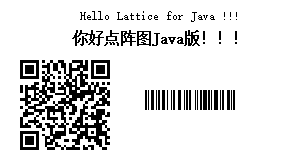
点阵图Java实现

记于:2024-07-14 晚上
地点:浙江省·温州市·家里
天气:多云

背景#

因项目需要,需要参考项目PHP版本中的点阵图生成功能,实现Java版本逻辑。

功能#

1.生成点阵图(画布)
2.绘制文本
3.绘制图片
4.绘制二维码、条形码
5.其他,略

实现思路#

主要是构建一个(二维数组)点阵模型,在其上根据坐标绘制各种素材(文本、图片、二维码、条形码);
在Java中可以使用java.atw.image.BufferedImage类来表示点阵模型(画布),使用Graphics2D类来绘制各种素材;
每种类型素材生成并返回一个BufferedImage对象,然后将其绘制到画布上。

绘制素材#

绘制二维码、条形码以及自定义图片都相对简单,最麻烦的是绘制文本,因为点阵形式下需要自行解析字体文件,并计算生成每个字符的点阵数据;
根据参考项目(LatticePHP)中的说明,是因为:普通的字体因为加了锐角、美化是不能直接用来生成点阵图的,必须使用点阵字体。但是这方面的市场非常小,所以做的人很少,仅有的几个还会收取高昂费用。

绘制图片素材#

示例代码:

1
2
3
4
5
6
7
8
9
10
11
12
13
14
15
16
17
public BufferedImage generateImage(String url) {
log.info("generateImage...url: {}", url);

URL url0;
try {
url0 = new URL(url);
} catch (MalformedURLException e) {
throw new RuntimeException(e);
}
BufferedImage bufferedImage;
try {
bufferedImage = ImageIO.read(url0);
} catch (IOException e) {
throw new RuntimeException(e);
}
return bufferedImage;
}

直接从网络地址读取图片,生成BufferedImage对象。

绘制二维码、条形码#

用到了zxing库,示例代码:

1
2
3
4
5
6
7
8
9
10
11
12
13
14
15
16
17
18
19
20
21
22
23
24
25
26
27
28
29
30
31
32
33
34
35
36
37
38
39
40
41
42
43
44
/**
* 生成二维码
*/
public BufferedImage generateQrCode(String text, int width, int height) {
log.info("generateQrCode...text: {}, width: {}, height: {}", text, width, height);

// 生成二维码BitMatrix
BitMatrix bitMatrix;
try {
// 不能按指定大小生成,先按自动大小生成,在convertToDotMatrixImage方法中缩放
bitMatrix = new QRCodeWriter().encode(text, BarcodeFormat.QR_CODE, 0, 0, this.hints);
} catch (WriterException e) {
throw new RuntimeException(e);
}
// 转换为点阵图像
return this.convertToDotMatrixImage(bitMatrix, width, height);
}

/**
* 生成条形码
*/
public BufferedImage generateBarCode(String text, int width, int height) {
log.info("drawBarCode...text: {}, width: {}, height: {}", text, width, height);

// 生成条形码BitMatrix
BitMatrix bitMatrix = new Code128Writer().encode(text, BarcodeFormat.CODE_128, 0, 0);
// 转换为点阵图像
return this.convertToDotMatrixImage(bitMatrix, width, height);
}

/**
* 将BitMatrix转换为点阵图像BufferedImage
* 生成二维码场景,当指定90x90,会生成49x49(bitMatrix尺寸是90x90但是内容是49x49居中)的二维码,需要进行缩放
*/
private BufferedImage convertToDotMatrixImage(BitMatrix bitMatrix, int desiredWidth, int desiredHeight) {
// 缩放二维码
BufferedImage qrImage = MatrixToImageWriter.toBufferedImage(bitMatrix);
BufferedImage scaledImage = new BufferedImage(desiredWidth, desiredHeight, BufferedImage.TYPE_BYTE_BINARY);
Graphics2D g = scaledImage.createGraphics();
g.drawImage(qrImage, 0, 0, desiredWidth, desiredHeight, null);
g.dispose();

return scaledImage;
}

遇到的问题:生成二维码时,按指定大小(90x90)生成不能生效;
原因:略,见参考资料(二维码尺寸问题);
解决:先按自动大小生成,然后在convertToDotMatrixImage方法按指定大小缩放。

绘制文本素材#

示例代码:

1
2
3
4
5
6
7
8
9
10
11
12
13
14
15
16
17
18
19
20
21
22
23
24
25
26
27
28
29
30
31
32
33
34
35
36
37
38
39
40
41
42
43
44
45
46
47
48
49
50
51
52
53
54
55
56
57
58
59
60
61
62
63
64
65
66
67
68
69
70
71
72
73
74
75
76
77
78
79
80
81
82
83
84
85
86
87
88
89
90
91
92
93
94
95
96
97
98
99
100
101
102
103
104
105
106
107
108
109
110
111
112
113
114
115
116
117
118
119
120
121
122
123
124
125
126
127
128
129
130
131
132
133
134
135
136
137
138
139
140
141
142
143
144
145
146
147
148
149
150
151
152
153
154
155
156
157
158
159
160
161
162
163
164
165
166
167
168
169
170
171
172
173
174
175
176
177
178
179
180
181
182
183
184
185
186
187
188
189
190
191
192
193
194
195
196
197
198
199
200
201
202
203
204
205
206
207
208
209
210
211
212
213
214
215
216
217
218
219
220
221
222
223
224
225
226
227
228
229
230
231
232
233
234
    /**
* 生成文本图像
*/
private BufferedImage generateTextImage(String text) throws IOException {
// 获取字体文件对象
// RandomAccessFile fontFile = this.getFontFile(this.fontFileName);

int fontWidth = this.fontWidth;
int fontHeight = this.fontHeight;
int byteCount = this.byteCount;

int textLength = text.length();

// list of char[][] 存放每个字符的点阵数据
ArrayList<char[][]> dotMatList = new ArrayList<>(textLength);

// 绘制每个字符
for (int i = 0; i < textLength; i++) {
char word = text.charAt(i);

// 获取字符码点
int codePoint = this.getCodePoint(String.valueOf(word));
// 修正24宽度字体的码点 ; 原因未知,copy自php版逻辑
codePoint = this.fixCodePointWhenFontWidth24(codePoint);
// 计算在字体文件中的位置
int position = codePoint * byteCount;
// 获取字体数据
// byte[] fontData = this.getFontData(fontFile, position, byteCount);
// fix: resources下的文件在打成jar后使用(RandomAccess)File读取失败,改为直接加载byte[]缓存到内存
byte[] fontData = this.readFontData(this.fontFileName, position, byteCount);
// convert to mat
char[][] dotMat = this.convertBytesToDotMat(fontData, fontHeight, fontWidth);

// 获取字符实际宽度
int realWidth = codePoint < 700 ? this.fontEn : this.fontZh;
// 按实际宽度切割重组
for (int j = 0; j < fontHeight; j++) {
// 自动宽度逻辑
realWidth = this.autoWidth ? this.getCharWidth(dotMat, this.fontZh, this.fontWidth) : realWidth;
// 空格间距逻辑
realWidth = codePoint == this.SPACE_CODE_POINT ? this.SPACE_WIDTH : realWidth;
// 按实际宽度切割
char[] row = dotMat[j];
char[] newRow = new char[realWidth];
System.arraycopy(row, 0, newRow, 0, realWidth);
// 加粗逻辑
newRow = this.setBold(newRow, this.bold);
// 字间距逻辑
newRow = this.setSpacing(newRow, this.fontSpace);

dotMat[j] = newRow;
}
// dotMat根据最长的长度补齐尾部
this.padDotMat(dotMat);

// 打印
// this.printDotMat(dotMat);
// 加入集合
dotMatList.add(dotMat);
}

// 整合所有dotMat from dotMatList
char[][] finalDotMat = this.mergeDotMat(dotMatList);

// 保存文本点阵宽度和高度
this.textBitWidth = finalDotMat[0].length;
this.textBitHeight = finalDotMat.length;

// 将所有dotMat绘制到图像
BufferedImage textImage = new BufferedImage(finalDotMat[0].length, fontHeight, BufferedImage.TYPE_BYTE_BINARY);
this.renderDotMatToImage(finalDotMat, textImage, 0, 0);

// fontFile.close();

return textImage;
}

/**
* 获取码点
*/
private int getCodePoint(String str) {
int codePoint = 0;
try {
// 获取字符串的代码点
codePoint = str.codePointAt(0);
} catch (IndexOutOfBoundsException e) {
// 处理字符串为空或其他异常情况
e.printStackTrace();
}
// 字符越界处理
if (codePoint > 65535) {
codePoint = 0;
}
return codePoint;
}

/**
* 修正24宽度字体的码点
* 将超出范围的码点修正为空格码点
*/
private int fixCodePointWhenFontWidth24(int codePoint) {
if (this.fontWidth == 24) {
if (codePoint <= this.SPACE_CODE_POINT || codePoint > this.fontMaxPosition) {
codePoint = this.SPACE_CODE_POINT;
}
}
return codePoint;
}

/**
* 转换字节数组为点阵多维数组
*/
private char[][] convertBytesToDotMat(byte[] fontData, int fontHeight, int fontWidth) {
// fontData bit -> char[]
char[] dots = new char[fontHeight * fontWidth];
for (int i = 0; i < fontData.length; i++) {
byte b = fontData[i];
for (int bit = 7; bit >= 0; bit--) {
int bitValue = (b >> bit) & 1;
dots[i * 8 + (7 - bit)] = bitValue == 1 ? '1' : '0';
}
}
// char[] -> char[][] by fontWidth
char[][] dotMat = new char[fontHeight][fontWidth];
for (int i = 0; i < fontHeight; i++) {
System.arraycopy(dots, i * fontWidth, dotMat[i], 0, fontWidth);
}
return dotMat;
}

/**
* 加粗逻辑
*/
private char[] setBold(char[] dot, boolean fontBold) {
if (!fontBold) {
return dot;
}

char[] result = new char[dot.length];
for (int i = 0; i < dot.length; i++) {
char current = dot[i];
char shifted = i == 0 ? '0' : dot[i - 1]; // 前一个字符,用'0'补齐
result[i] = (current == '1' || shifted == '1') ? '1' : '0';
}

return result;
}

/**
* 字间距逻辑
*/
private char[] setSpacing(char[] dotArray, int spacing) {
if (spacing <= 0) {
return dotArray; // 如果 spacing <= 0,直接返回原数组
}

char[] result = new char[dotArray.length + spacing];
int index = 0;

for (char c : dotArray) {
result[index++] = c;
}

// 添加字间距
for (int i = 0; i < spacing; i++) {
result[index++] = '0';
}

return result;
}

/**
* 对齐点阵尾部
*/
private void padDotMat(char[][] dotMat) {
// 先获取最长的长度
int maxRowLength = 0;
for (char[] row : dotMat) {
maxRowLength = Math.max(maxRowLength, row.length);
}
// dotMat根据最长的长度补齐尾部
for (int k = 0; k < dotMat.length; k++) {
char[] row = dotMat[k];
char[] newRow = new char[maxRowLength];
System.arraycopy(row, 0, newRow, 0, row.length);
for (int j = row.length; j < maxRowLength; j++) {
newRow[j] = '0';
}
dotMat[k] = newRow;
}
}

/**
* 合并多个点阵
*/
private char[][] mergeDotMat(ArrayList<char[][]> dotMatList) {
// 计算最终宽度
int finalWidth = this.calcFinalWidth(dotMatList);
int fontHeight = this.fontHeight;
char[][] finalDotMat = new char[fontHeight][finalWidth];
int columnIndex = 0;
for (char[][] chars : dotMatList) {
int rowIndex = 0;
for (char[] aChar : chars) {
System.arraycopy(aChar, 0, finalDotMat[rowIndex++], columnIndex, aChar.length);
}
columnIndex += chars[0].length;
}
return finalDotMat;
}

/**
* 计算最终宽度
*/
private int calcFinalWidth(ArrayList<char[][]> dotMatList) {
int finalWidth = 0;
for (char[][] dotMat : dotMatList) {
finalWidth += dotMat[0].length;
}
return finalWidth;
}

/**
* 将dotMat绘制到图像
*/
private void renderDotMatToImage(char[][] dotMat, BufferedImage image, int x, int y) {
for (int j = 0; j < dotMat.length; j++) {
char[] row = dotMat[j];
for (int k = 0; k < row.length; k++) {
char bitValue = dotMat[j][k];
image.setRGB(x + k, y + j, bitValue == '1' ? Color.BLACK.getRGB() : Color.WHITE.getRGB());
}
}
}

加载/读取字体数据相关代码:

1
2
3
4
5
6
7
8
9
10
11
12
13
14
15
16
17
18
19
20
21
22
23
24
25
26
27
28
29
30
31
32
33
34
35
36
37
38
39
40
private final Map<String, byte[]> fontFileDataMap = new ConcurrentHashMap<>();

private byte[] readFontData(String fontFileName, int position, int byteCount) throws IOException {
byte[] fontFileData = fontFileDataMap.get(fontFileName);
if (fontFileData == null) {
fontFileData = this.loadFontFileData(fontFileName);
}

byte[] fontData = new byte[byteCount];
System.arraycopy(fontFileData, position, fontData, 0, byteCount);
return fontData;
}

private synchronized byte[] loadFontFileData(String resourcePath) throws IOException {
// 检查并发场景下其他线程是否已加载,避免重复加载
byte[] fontFileData = fontFileDataMap.get(fontFileName);
if (fontFileData != null) {
return fontFileData;
}

try (InputStream inputStream = LatticeText.class.getClassLoader().getResourceAsStream(resourcePath);
ByteArrayOutputStream buffer = new ByteArrayOutputStream()) {
if (inputStream == null) {
throw new IOException("Resource not found: " + resourcePath);
}

byte[] data = new byte[1024];
int bytesRead;

// Read the input stream into the byte array output stream
while ((bytesRead = inputStream.read(data, 0, data.length)) != -1) {
buffer.write(data, 0, bytesRead);
}

// Return the byte array
fontFileData = buffer.toByteArray();
fontFileDataMap.put(fontFileName, fontFileData);
return fontFileData;
}
}

以上代码省略了属性和部分方法,主要流程如下:
1.遍历文本,准备获取每个字符的点阵数据
2.获取字符码点
3.根据码点和每个字符点阵数据的字节数,计算在字体文件中的位置
4.读取/加载字体文件/数据
5.将字节数组转换为点阵多维数组,每个比特用一个char(‘0’|’1’)表示
6.根据码点值确认中英文,再处理加粗、间距等逻辑
7.补齐点阵数据宽度,加入集合
8.向右合并所有点阵数据,生成最终点阵数据
9.将点阵数据绘制到图像并返回

遇到的问题:
由于打包后文件布局发生变化,目标文件是在jar包中而不是直接在文件系统中,所以无法直接使用RandomAccessFile读取;
解决:
直接以resource方式读取字体数据到内存并缓存;

效果示例:
点阵图

参考资料#